This function repeats a text string a specified number of times.
Syntax
REPT(text; number_times)
Arguments
- text (required): The character or string to repeat.
- number_times (required): A positive number specifying repetition count.
Background
The REPT() function is useful for:
- Creating repeated patterns (e.g., filling cells with characters).
- Generating in-cell bar charts or visual indicators.
Key Notes:
- Returns « » (empty string) if number_times is 0.
- Truncates decimal values (e.g., 3.9 becomes 3).
- Returns #VALUE! if:
- number_times is negative.
- Result exceeds 32,767 characters.
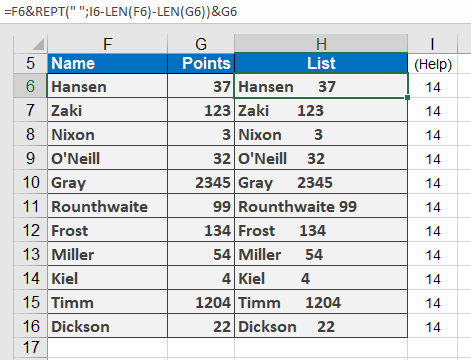
Example: Aligning Names and Scores
- Setup:
- Names in F6:F16, scores in G6:G16.
- Goal: Combine in H6:H16 with aligned spacing.
- Step 1: Calculate Max Length
Select I6:I16 and enter (as an array formula with Ctrl+Shift+Enter):
=MAX(LEN(F6:F16) + LEN(G6:G16)) + 1
Result: Determines maximum combined length for alignment.
- Step 2: Align Text
In H6, enter:
=F6 & REPT( » « , I6 – LEN(F6) – LEN(G6)) & G6
How it works:
-
- Repeats spaces ( » « ) to pad between names and scores.
- Adjusts spacing dynamically based on each row’s text length.