
This function returns TRUE if the number is even, and FALSE if it is odd.
Syntax
ISEVEN(number)
Arguments
- number (required) – The expression to be checked.
Background
- Accepts any numeric expression.
- Integers are evaluated directly.
- Decimal numbers are truncated before evaluation (e.g., 2.4 becomes 2, -1.6 becomes -1).
- Returns #VALUE! for non-numeric inputs (e.g., text, logical values).
- Counterpart to ISODD():
ISEVEN(number) = NOT(ISODD(number))
Example
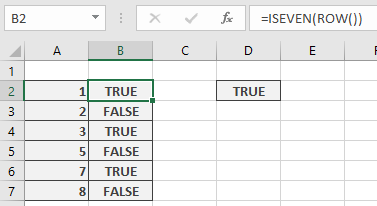
Scenario: Apply alternating row colours in a worksheet using conditional formatting.
- Preferred Method:
Use ISEVEN() with the ROW() function:
=ISEVEN(ROW())
-
- Applies formatting to even-numbered rows
- How it works: Divides the row number by 2 and compares the truncated result to the original division. If equal, the row is even.