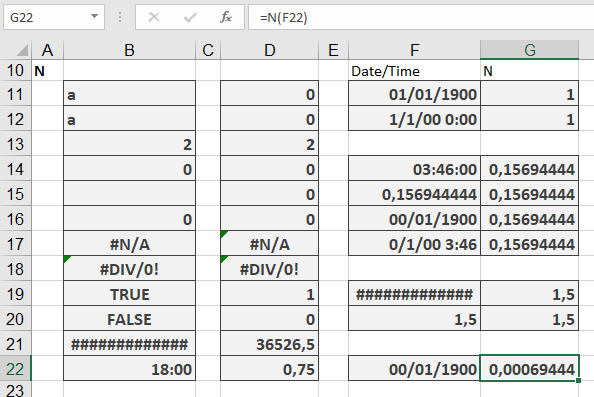
This function returns a value converted into a number.
Syntax. N(value)
Arguments
- value (required). The expression (a number, text, a formula without an equal sign, a logical value, an error value, a reference, or a name) that you want to convert into a number.
Background. Usually, you don’t need to use the N() function because Excel automatically converts values when a number is required. However, the IS() functions are an exception. For compatibility with other spreadsheet software, this function remains available.
The N() function converts expressions as shown in Table 1.
Table 1. Conversion Results with the N() Function
| Argument (Expression) | Return Value |
| Number | The same number |
| Date | Serial number for the date |
| Time | Number for the time |
| TRUE | 1 |
| FALSE | 0 |
| Error value | The same error value |
| Text or an empty cell | 0 |
Example. For examples of this function’s usage, see the « Time Basics » Inside Out sidebar in this chapter.