
This function counts the number of non-empty cells within a specified column, list, or database that match the given conditions.
Syntax
DCOUNTA(database; field; criteria)
Arguments
- database (required): This is the cell range that defines your list or database.
- field (optional): This indicates which column the function should use.
- criteria (required): This is the cell range containing the field names and the filter criteria.
Background
DCOUNTA() is different from DCOUNT() because it counts non-empty cells, whereas DCOUNT() specifically counts numerical values.
Example
Let’s say your business is relatively new, and you want to find out how many invoices were sent to companies in the United States. You also need the total number of invoices in your database to calculate the percentage of invoices sent to U.S. companies.
First, open a new worksheet and define your criteria range using the « Country/Region » field from your original data. Then, specify « USA » as your search criterion (see Figure below).
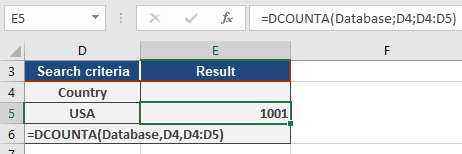
Since DCOUNTA() counts text, it will return the number of records that match « USA ». For the database argument, specify the cell range containing your database, such as A1:F7008. In this example, that cell range is dynamically named « Database ».
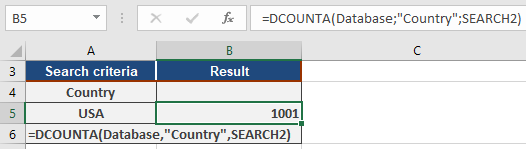
You’ll get the same result if you enter « SEARCH2 » for the criteria range (A4:A5 in this example) and input « country/region » instead of cell A4 in the field argument. Just remember to enclose the field name, « country/region », in quotation marks.
The result will still be 1001; this means your database contains 1,001 records matching the « USA » criterion, indicating that 1,001 invoices were sent to companies in the United States (see Figure below).
Now, to calculate the total number of invoices issued, you’ll do it the same way. The search range remains unchanged, but to count all records in the « country » search range, refer the search criterion to an empty cell (see Figure below).
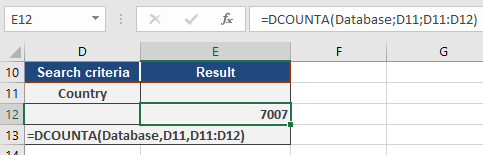
After you’ve calculated a total of 7,007 for all invoices, you can then figure out the percentage of invoices sent to companies within the United States. As shown in Figure below, you can calculate this percentage using the DCOUNTA() function.

Although this method might seem a bit tedious, it’s effective. You’ll find that 14 percent of your invoices go to companies in the United States, with the remaining invoices sent to companies outside th.e U.S