This function returns the value of a member (cell) from a cube.
Syntax
CUBEVALUE(connection; member_expression1; member_expression2; …)
Arguments
- connection (required): A string representing the name of the workbook connection to the cube, enclosed in quotation marks. After you type the first quotation mark, existing context-sensitive data connections will be displayed.
- member_expression1 (required) and member_expression2 (optional): You must provide at least one and up to 255 expressions that define the position of a member in the cube based on a Multidimensional Expression (MDX). The expression can be entered directly or referenced from a cell. Tuples can also be used in expressions. Alternatively, a member_expression can be a set defined with the CUBESET() function. If no measure is specified in a member_expression, the default measure for that cube is used. Because this argument can be repeated, you can define intersections. You can also use tuples.
Background
When you use CUBEVALUE() as an argument for another cube function, the MDX expression (rather than the displayed value) is used in the argument.
Error values and messages provide information about incorrect or missing entries:
- If the connection name is not a valid workbook connection, the CUBEVALUE() function returns the #NAME? error.
- If the OLAP server (or the offline cube) is unavailable, an error message will appear, but the content of the affected cell will not change.
- If at least one member within the arguments or the tuple is invalid, the CUBEVALUE() function returns the #VALUE!.
- If a member_expression is longer than 255 characters, the CUBEVALUE() function returns the #VALUE!.
- CUBEVALUE() returns the #N/A error when:
- The member_expression syntax is incorrect.
- The member specified in the MDX query does not exist in the cube.
- The tuple is invalid because there is no intersection for the specified values.
- The set contains at least one member with a different dimension from the other members.
- CUBEVALUE() might also return the #N/A error when the connection to the data source is interrupted and cannot be re-established.
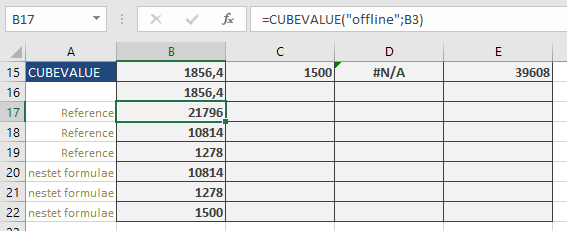
The formula: =CUBEVALUE(« offLine », »[Measures].[GrossSales] », »[Stores].[Store].[All].[NorthEast] », »[Years].[Year].[All].[2009] », »[Products].[Product].[All].[Cookies] ») calculates the gross sales for cookies in the « NorthEast » store in the year 2009, which is $1,856.40. You will get the same result if you use a tuple (where the arguments of the previous formula are enclosed in parentheses): =CUBEVALUE(« offline », »([Measures].[GrossSales],[Stores].[Store].[All].[NorthEast],[Years].[Year].[All].[2009],[Products].[Product].[All].[Cookies]) »)
If you enter the formula =CUBEMEMBER(« offLine », »[Products].[Product].[All].[Cookies] ») in cell B3, then the formula =CUBEVALUE(« offline »,B3) returns the total sales for cookies: $21,796.
You can also use examples from the CUBEKPIMEMBER() function. For instance, the formula: =CUBEVALUE(« offline »,CUBERANKEDMEMBER(« offline »,CUBESET(« offline », »[Stores].[Store].Children », »all store sales »,2; »[Measures].[Sale] »),1)) returns $10,814 for the total sales of the best-performing store (« NorthEast »).