
Most of the time, you’ll want to save your workbooks in the standard file format (.xlsx). However, sometimes you may need to save a workbook in a different format, such as an earlier version of Excel, a text file, or a PDF or XPS file. Keep in mind that when you save a workbook in a different file format, some formatting, data, and features may be lost.
To get a list of file formats (also called file types) you can open or save in Excel:
- Open the workbook you want to save.
- Click File > Save As.
- Under Locations, choose where to save the workbook. For example, select OneDrive to save it online, or Computer to save it in a local folder such as Documents.
- In the Save As dialog box, navigate to the desired location.
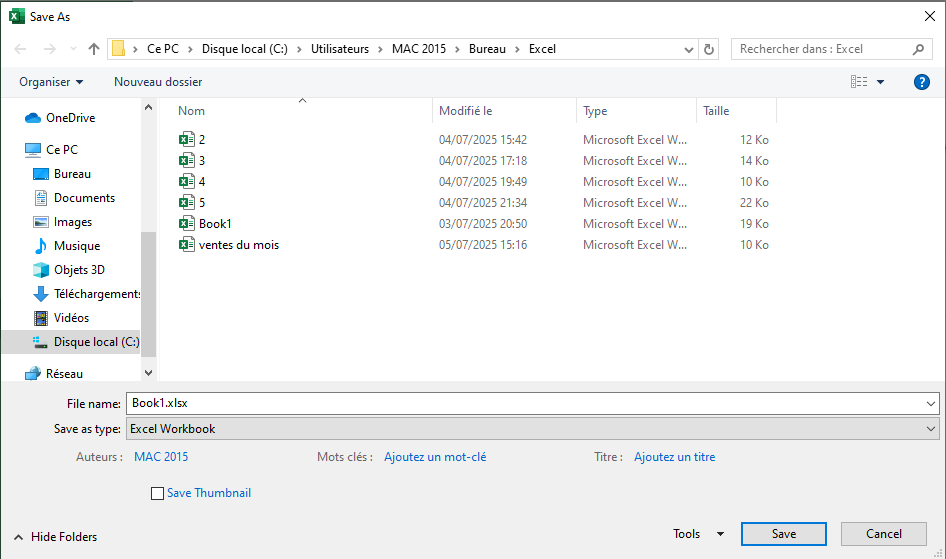
- In the File type list, click the format you want. Click the arrows to scroll through formats not immediately visible.
In the File name box, either accept the suggested name or type a new name for the workbook.
Excel File Formats
| Format | Extension | Description |
|---|---|---|
| Excel Workbook | .xlsx | Default XML-based format for Excel 2007–2019. Does not support VBA macros or Excel 4.0 macro sheets (.xlm). |
| Strict Open XML Spreadsheet | .xlsx | ISO strict version of the Excel workbook (.xlsx) file format. |
| Excel Macro-Enabled Workbook | .xlsm | XML-based file format that supports macros for Excel 2007–2019. Stores VBA macro code or Excel 4.0 macro sheets (.xlm). |
| Excel Binary Workbook | .xlsb | Binary file format (BIFF12) for Excel 2007–2019. |
| Excel Template | .xltx | Default template file format for Excel 2007–2019. Does not support VBA macros or Excel 4.0 macro sheets (.xlm). |
| Macro-Enabled Template | .xltm | File format supporting macros for Excel templates in Excel 2007–2019. Stores VBA macro code or Excel 4.0 macro sheets (.xlm). |
| Excel 97–2003 Workbook | .xls | Binary file format for Excel 97–2003 (BIFF8). |
| Excel 97–2003 Template | .xlt | Binary template file format for Excel 97–2003 (BIFF8). |
| Excel 5.0/95 Workbook | .xls | Binary file format for Excel 5.0/95 (BIFF5). |
| XML Spreadsheet 2003 | .xml | XML Spreadsheet format (XMLSS). |
| XML Data | .xml | XML data format. |
| Excel Add-in | .xlam | XML-based add-in format that supports macros for Excel 2007–2019. An add-in is a supplemental program to run additional code. Supports VBA projects and Excel 4.0 macro sheets (.xlm). |
| Excel 97–2003 Add-in | .xla | Add-in program to run additional code. Supports VBA projects. |
| Excel 4.0 Workbook | .xlw | Excel 4.0 format that only stores worksheets, chart sheets, and macro sheets. You can open but not save to this format in Excel 2019. |
Text File Formats
| Format | Extension | Description |
|---|---|---|
| Formatted Text (space-delimited) | .prn | Space-delimited Lotus format. Saves only the active sheet. |
| Text (tab-delimited) | .txt | Saves a workbook as a tab-delimited text file for use with another Microsoft Windows OS and ensures proper interpretation of tabs, page breaks, etc. Saves only the active sheet. |
| Text (Macintosh) | .txt | Saves as a tab-delimited text file for use on Macintosh. Ensures proper interpretation of tabs, page breaks, etc. Saves only the active sheet. |
| Text (MS-DOS) | .txt | Tab-delimited format for MS-DOS systems. Saves only the active sheet. |
| Unicode Text | .txt | Saves workbook as Unicode text (character encoding standard by Unicode Consortium). |
| CSV (comma-delimited) | .csv | Saves a workbook as comma-separated values for use with another Windows OS. Saves only the active sheet. |
| CSV (Macintosh) | .csv | Saves as comma-separated values for Macintosh. Saves only the active sheet. |
| CSV (MS-DOS) | .csv | Comma-delimited for MS-DOS systems. Saves only the active sheet. |
| DIF | .dif | Data Interchange Format. Saves only the active sheet. |
| SYLK | .slk | Symbolic Link format. Saves only the active sheet. |
Note: If you save a workbook in text format, all formatting will be lost.
Other File Formats
| Format | Extension | Description |
|---|---|---|
| DBF 3, DBF 4 | .dbf | dBase III and IV. You can open, but not save to this format in Excel. |
| OpenDocument Spreadsheet | .ods | You can save Excel 2010 files in OpenDocument format (e.g. Google Docs, OpenOffice Calc). Formatting may be lost when saving/opening .ods files. |
| Portable Document Format. Retains document formatting and allows file sharing. Ideal for online viewing or professional printing. Cannot be easily edited. | ||
| XPS Document | .xps | XML Paper Specification. Preserves formatting and is shareable. Ensures consistent appearance and protects content from easy modification. |
Clipboard File Formats
If you’ve copied data from the Clipboard in one of the following formats, you can paste it into Excel using Paste or Paste Special (Home / Clipboard / Paste).
| Format | Extension | Clipboard Type Identifiers |
|---|---|---|
| Picture | .wmf or .emf | WMF or EMF image formats. Note: Excel converts WMF images pasted from other programs to EMF format. |
| Bitmap | .bmp | Bitmap (BMP) image format. |
| Excel File Formats | .xls | Binary formats for Excel 5.0/95 (BIFF5), Excel 97–2003 (BIFF8), Excel 2013 (BIFF12). |
| SYLK | .slk | Symbolic Link format. |
| DIF | .dif | Data Interchange Format. |
| Text (tab-delimited) | .txt | Tab-delimited text format. |
| CSV (comma-delimited) | .csv | Comma-separated values format. |
| Formatted Text (*.prn) | .rtf | Rich Text Format (RTF). Excel only. |
| Embedded Object | .gif, .jpg, .doc, .xls, .bmp | Microsoft Excel objects, OLE 2.0 compatible programs, images, or other presentation formats. |
| Linked Object | .gif, .jpg, .doc, .xls, .bmp | OwnerLink, ObjectLink, Link, Picture, or other formats. |
| Office Drawing Object | .emf | Office Drawing or Picture format (EMF). |
| Text | .txt | Display Text, OEM Text. |
| Single File Web Page | .mht, .mhtml | Web page with embedded media, applets, links, and referenced content. |
| Web Page | .htm, .html | HTML format (Hypertext Markup Language). Note: When copying text from another program, Excel pastes it in HTML format regardless of the original format. |