
This function calculates the average of the values in an argument list. Unlike AVERAGE(), it includes not only numbers but also text and logical values (TRUE and FALSE) in the calculation.
Syntax:
AVERAGEA(value1; [value2] …)
Arguments:
- value1(required) and value2 (optional): At least one and up to 255 arguments for which you want to calculate the average.
Background:
For more details on averages, refer to the definition of AVERAGE().
The following rules apply to AVERAGEA():
- If an argument contains text (specified as an array or reference), it is evaluated as 0.
- Arguments containing TRUEevaluate as 1, and those containing FALSE evaluate as 0.
Note: If you do not want to include text values in the calculation, use the AVERAGE() function instead.
Example:
You work in the controlling department of a software company and create an Excel table containing sales data for the past twelve months.
Since the list includes text and logical values, you calculate the average sales using AVERAGEA().
- In the first column, you enter the text « Closed » for February (see Figure below). Because AVERAGEA()automatically converts text to 0, all 12 values are summed, and the total is divided by 12. The result is $916.67.
- The second column contains TRUEinstead of « Closed. » This logical value is evaluated as 1. Again, all 12 values are summed, and the total is divided by 12. The result is $916.75.
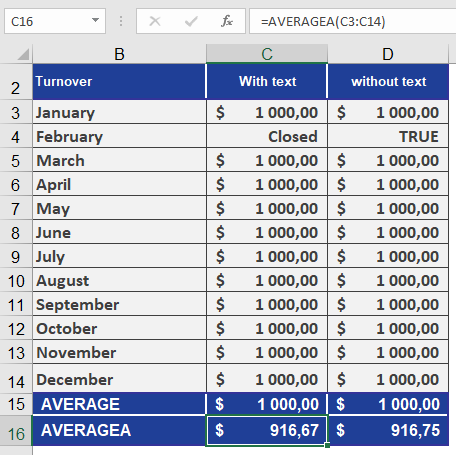
If you had used AVERAGE() instead, text values would be excluded—only 11 values would be summed, and the total divided by 11. In this case, the result would be $1,000.00.