This function counts the number of numeric entries in an argument list. The COUNT() function tallies cells containing numbers within a specified range or array.
Syntax
COUNT(value1; [value2]; …)
Arguments
- value1(required): The first item, cell reference, or range to count
- value2,…(optional): Additional items, cell references, or ranges to count (up to 255 total arguments, or 30 in Excel 2003 and earlier)
Only numeric values are counted; text, logical values, or empty cells are ignored.
Background
While simple in function, COUNT() provides significant time savings, particularly when working with large datasets. Manual counting in extensive tables would be impractical and error-prone.
Example
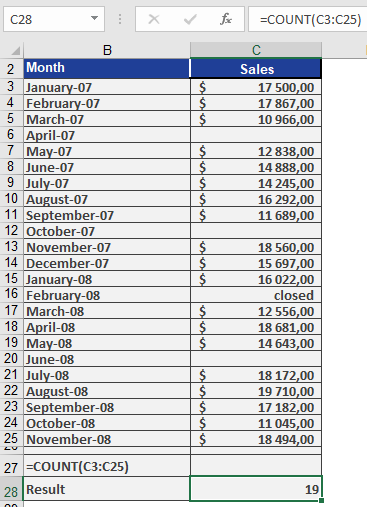
Figure below displays sales data from January 2007 through November 2008 entered by sales representatives.
As sales manager, you use COUNT(C3:C25) to determine how many months saw sales activity over this two-year period. The function returns 19, indicating sales occurred in 19 of the 23 months.