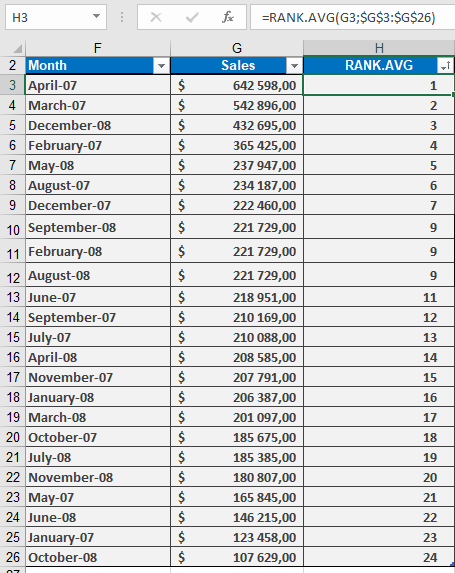
Returns the rank of a specified number within a dataset, using average ranking for tied values. Unlike RANK() which skips subsequent ranks for duplicates, this function assigns the average rank to all identical values.
Syntax:
RANK.AVG(number; ref; [order])
Arguments
| Argument | Description |
| number (required) | The numeric value to be ranked. |
| ref (required) | The array or range containing the dataset. Non-numeric values are ignored. |
| order (optional) | Ranking order: |
- 0 (or omitted): Descending (highest value = rank 1).
- Non-zero: Ascending (lowest value = rank 1). |
Key Features
- Handling Ties:
- If multiple values are identical, they receive the average of their potential ranks.
- Example: Values (10, 20, 20, 30) ranked in descending order:
- 30 → Rank 1
- Both 20s → Average of ranks 2 and 3 → 2.5
- 10 → Rank 4
- Comparison with Other Rank Functions:
| Function | Behavior with Ties |
| RANK() / RANK.EQ() | Assigns same rank, skips subsequent ranks. |
| RANK.AVG() | Assigns average rank to tied values. |
- Use Cases:
- Fair ranking in competitions with tied scores.
- Statistical analysis requiring precise percentile calculations.
Example & Background
For practical applications (e.g., sales data ranking), see the figure below, which includes: