This function calculates depreciation amounts using a multiple-rate (accelerated) depreciation method.
Syntax
DDB(Purchase_Value; Residual_Value; Life; Period; [Factor])
Arguments
- Purchase_Value (required)
The purchase cost of an asset (net purchase price plus incidental expenses minus purchase cost reductions).- If a non-numeric value is provided, the #VALUE! error is returned.
- If a negative number is entered, the #NUMBER! error is returned.
- Residual_Value (required)
The value of the asset at the end of its depreciation period.- If a non-numeric value is provided, the #VALUE! error is returned.
- If a negative number is entered, the #NUMBER! error is returned.
- Life (required)
The number of periods over which the asset is depreciated.- Must be a positive integer.
- Period (required)
The specific period within the depreciation duration for which the depreciation amount is calculated.- Must be a positive integer not exceeding the value of Life.
- Factor (optional)
The multiplier applied to the straight-line depreciation rate (reciprocal of the depreciation duration).- If omitted, Excel uses a default value of 2 (double-declining balance method).
Background
Depreciation reflects the loss of an asset’s value over time and makes this loss visible. It should not be confused with wear-and-tear depreciation, which relates to the cost allocation of an asset as an operating expense from a tax perspective.
This method initially follows straight-line depreciation but applies an additional factor to the depreciation rate, making it a geometric (accelerated) depreciation.
- If the factor is 2, it is called the double-declining balance method.
- Higher factors result in faster depreciation in early periods.
Example
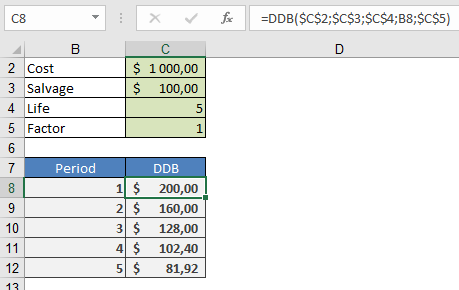
An asset with a purchase cost of $1,000.00 is depreciated over five years to a residual value of $100.00 using the double-declining balance method.
- The depreciation amount for each period can be calculated using DDB() and subtracted from the previous period’s book value.
- Alternatively, a custom depreciation schedule can be created, especially for tax-compliant methods, as built-in functions may not always apply.