
Calculates the effective annual interest rate (compounded) from a nominal annual rate, accounting for intra-year compounding periods.
Syntax
EFFECT(Nominal_Interest; Periods)
Arguments
- Nominal_Interest (required)
The stated annual nominal interest rate (e.g., 0.05 for 5%). Must be > 0. - Periods (required)
The number of compounding periods per year (e.g., 12 for monthly). Must be ≥ 1 (decimal places truncated).
Error Handling
- #VALUE! if non-numeric inputs are provided.
- #NUMBER! if:
- Nominal_Interest ≤ 0.
- Periods < 1.
Background
- Nominal vs. Effective Rates:
- Nominal rates ignore compounding (e.g., 5% annual, paid monthly = 5%/12 per period).
- Effective rates reflect actual annual yield after compounding (e.g., 5% nominal → ~5.12% effective for monthly compounding).
- Formula:

Examples
- Savings Account
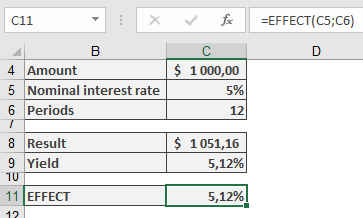
- Scenario: $1,000 deposited at 5% nominal interest, compounded monthly.
- Calculation:
=EFFECT(5%, 12) → Returns **5.12%**
-
- Verification:
- Monthly interest: 5%/12 = 0.4167%.
- Year-end balance: =FV(5%/12, 12, , -1000) = $1,051.16.
- Effective yield: (1051.16 / 1000) – 1 = 5.12%.
- Verification:
- Mortgage Loan
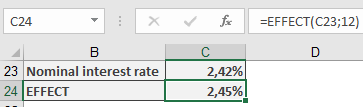
- Scenario: Bank offers 2.42% nominal rate, compounded monthly.
- Calculation:
=EFFECT(2.42%, 12) → Returns **2.45%** (matches advertised effective rate).
-
- Note: Banks may use alternative methods; exact matches may be coincidental.
Key Points
- Comparison Tool: Use to compare loans/investments with different compounding frequencies.
- Limitations: Assumes reinvestment at the same rate; does not account for fees or irregular payments.