
Its calculates the equivalent annual interest rate (in arrears) for a discounted security (e.g., zero-coupon bond) with intra-year maturity.
Syntax
INTRATE(Settlement; Maturity; Investment; Repayment; [Basis])
Arguments
| Argument | Description |
| Settlement (required) | Purchase date of the security (time truncated). |
| Maturity (required) | Maturity/redemption date (time truncated). |
| Investment (required) | Purchase price (must be > 0). |
| Repayment (required) | Redemption value at maturity (must be > 0). |
| Basis (optional) | Day-count convention (see Table 15-2). Default: 0 (US 30/360). |
Error Handling
- #VALUE! → Invalid dates or non-numeric inputs.
- #NUMBER! → If:
- Investment ≤ 0 or Repayment ≤ 0.
- Basis < 0 or > 4.
- Settlement ≥ Maturity.
Background
- Anticipative vs. Arrears Yield:
- Anticipative (DISC): Interest deducted upfront (e.g., T-bills).
- Arrears (INTRATE): Interest paid at maturity (converted to annual equivalent).
- Formula:

- Comparison: Use to contrast with fixed-income securities paying periodic interest.
Example
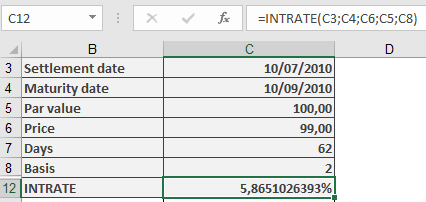
Treasury Bill (T-Bill) Calculation
- Purchase Date: 10, 07, 2010
- Maturity: 10, 09, 2010
- Purchase Price (Investment): $99
- BASIS: 2
- Par Value: 100
=INTRATE(« 10/09/2010 », « 10/09/2010 », 99, 100, 2)
Result: 5.87% annual yield.
Key Notes
- No Compounding: Simple interest only.
- Inverse of DISC(): Converts discount rate to equivalent annual yield.
- Use Case: Compare short-term securities (e.g., commercial paper, T-bills).