Calculates the price of a fixed-interest security, accounting for a first interest period that is either shorter or longer than subsequent regular periods (quarterly, semi-annual, or annual).
Syntax
ODDFPRICE(Settlement; Maturity; Issue; First_Interest_Date; Rate; Yield; Repayment; Frequency; [Basis])
Arguments
- Settlement (required) – The date the security is transferred to the buyer.
- Maturity (required) – The date the security’s principal is repaid.
- Issue (required) – The issuance date of the security.
- First_Interest_Date (required) – The date of the first interest payment.
- Rate (required) – The bond’s nominal annual interest rate (coupon rate).
- Yield (required) – The market yield for bonds of the same maturity.
- Repayment (required) – The redemption value per 100 units of par value.
- Frequency (required) – Number of interest payments per year (1 = annual, 2 = semi-annual, 4 = quarterly).
- Basis (optional) – Day-count convention . Defaults to 0 if omitted.
Notes
- Dates must be entered without time values; decimals are truncated.
- Frequency and Basis are truncated to integers.
- If dates are invalid, #VALUE! is returned.
- Yield and Repayment must be non-negative; otherwise, #NUM! is returned.
- If Frequency is not 1, 2, or 4, or Basis is outside 0–4, #NUM! is returned.
- The chronological order must be:
Maturity > First_Interest_Date > Settlement > Issue; otherwise, #NUM! is returned.
Background
The function applies the financial principle:
Creditor’s Payment = Debtor’s Payment
At the transaction’s start, the security’s price plus accrued interest equals the present value of future cash flows (interest + principal). The price is expressed as a percentage of par (e.g., 100 units).
Calculating present value is straightforward if:
- The settlement coincides with an interest payment date, and
- Interest is paid annually.
However, complexities arise with:
- Settlement between interest dates, or
- Multiple annual payments.
Finance mathematics uses various methods (e.g., Moosmüller, Braess/Fangmeyer, ISMA) to handle partial periods. For ISMA compatibility with Excel, see the PRICE() and YIELD() background notes.
Formula (Simplified Case)
For annual payments (360-day year) and a shortened first period, the formula in Excel Help reduces to:
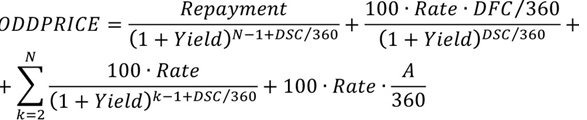
Formula variables:
- N = Total interest periods,
- A = Days from issue to settlement,
- DSC = Days from settlement to first interest date,
- DFC = Days from first interest date to maturity.]
Unlike PRICE(), the first period is treated separately (not summed with others) because its coupon is partial.
For Frequency > 1, Rate and Yield are adjusted for intra-year periods.
For lengthened first periods, the formula accounts for hypothetical interim interest payments realized at the period’s end. Accrued interest is handled similarly.
Note: The function is irrelevant once the first interest date passes.
Example
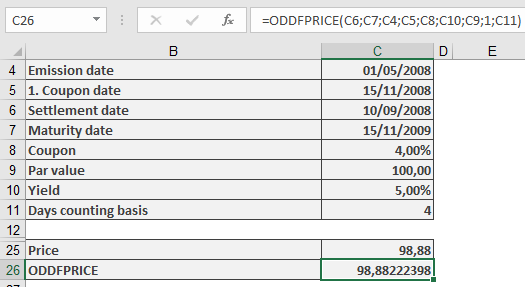
The sample files include a fictitious bond calculation with a shortened first interest period. The result aligns with ODDFPRICE()‘s output.