
Its Calculates depreciation for an asset using the declining balance method, with an optional switch to straight-line depreciation when advantageous. This flexible approach is commonly used for tax purposes.
Syntax
VDB(Cost; Salvage; Life; Start_Period; End_Period; [Factor]; [No_Switch])
Arguments
| Argument | Required | Description | Validation Rules |
| Cost | Yes | Initial asset value (purchase price + expenses). | Must be positive. |
| Salvage | Yes | Asset value at end of depreciation. | Must be ≥ 0 and < Cost. |
| Life | Yes | Useful life in periods (integer). | Must be > 0. |
| Start_Period | Yes | Starting period for depreciation calculation. | Must be < Life. |
| End_Period | Yes | Ending period for depreciation calculation. | Must be ≥ Start_Period. |
| [Factor] | No | Accelerated depreciation rate (default=2 for double-declining). | Typically 1.5–2. |
| [No_Switch] | No | FALSE (default): Switches to straight-line when optimal; TRUE: Forces declining balance. | Logical (TRUE/FALSE). |
Error Conditions
- #VALUE!: Non-numeric inputs.
- #NUM!: If:
- Cost ≤ 0 or Salvage < 0
- Life ≤ 0 or Start_Period ≥ Life
- Factor ≤ 0
Background
The Variable Declining Balance (VDB) method combines:
- Accelerated Depreciation: Higher expenses in early years (e.g., double-declining balance).
- Automatic Switch to Straight-Line: When straight-line depreciation exceeds the declining balance amount.
Key Formula
Depreciation=Book Value×(FactorLife)Depreciation=Book Value×(LifeFactor)
- Book Value = Cost – Accumulated Depreciation.
- Switch Condition: If straight-line depreciation > declining balance, VDB switches.
Example
Asset Depreciation:
- Cost: $1,000
- Salvage: $100
- Life: 10 years
- Factor: 2 (double-declining)
- No_Switch: FALSE (auto-switch enabled)
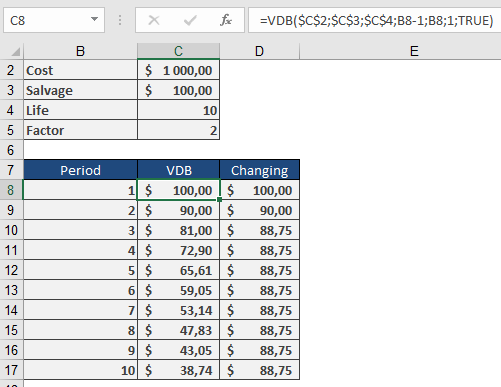
Depreciation Schedule
| Year | Method | Depreciation | Book Value |
| 1 | Double-Declining | $200.00 | $800.00 |
| 2 | Double-Declining | $160.00 | $640.00 |
| 3 | Double-Declining | $128.00 | $512.00 |
| 4 | Straight-Line* | $103.00 | $409.00 |
| … | … | … | … |
*Switches to straight-line in Year 4 when it becomes more beneficial.
Key Features
- Tax Optimization: Maximizes early-year deductions.
- Flexibility: Adjust Factor for local tax rules (e.g., 1.5× for mid-range acceleration).
- Partial Periods: Combine with manual adjustments for mid-year purchases.
Complementary Functions
- DB(): Fixed declining balance (no switch).
- DDB(): Double-declining balance (no switch).
- SLN(): Straight-line depreciation.