
Its calculates the net present value (NPV) of a series of cash flows occurring at irregular intervals, discounted at a specified annual rate. Unlike standard NPV, XNPV uses exact dates for precise time-adjusted valuation.
Syntax
XNPV(Rate; Values; Dates)
Arguments
| Argument | Required | Description | Validation Rules |
| Rate | Yes | Annual discount rate (e.g., 10% = 0.10). | Must be numeric. |
| Values | Yes | Array of cash flows: • Negative: Outflows (costs) • Positive: Inflows (income). |
Must include ≥1 positive and ≥1 negative value. |
| Dates | Yes | Exact dates corresponding to each cash flow. | Dates must align with Values array; first date = start point. |
Error Conditions
- #VALUE!: Invalid date format.
- #NUM!: If:
• Dates/Values arrays mismatch in size
• All cash flows are positive/negative
• Dates are non-chronological.
Key Formula
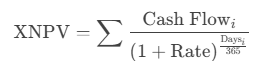
Where Days = Exact days from the first date in the series.
Example: Evaluating Discount Terms
Scenario:
A dealer offers payment terms with discounts for early payment. Compare against a 10% annual investment yield.
Cash Flows:
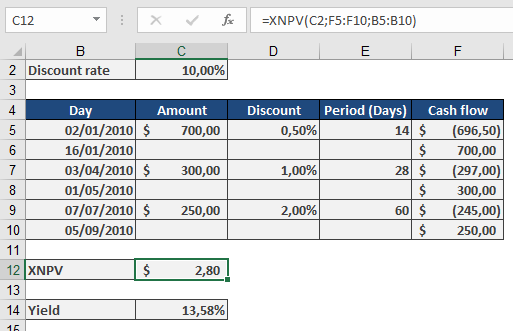
Calculation:
Effective Yield (XIRR Verification):
=XIRR({-696.5, -297, -245, 700, 300, 250}, {« 1/2/2010 », « 4/3/2010 », « 7/7/2010 », « 1/16/2010 », « 5/1/2010 », « 9/7/2010 »})
Result: 13.58% (beats 10% alternative).
Why Use XNPV?
- Precision: Accounts for exact days between cash flows (e.g., 14 days vs. « 1 month »).
- Flexibility: Evaluates irregular income/expenditures (e.g., project milestones, custom payment plans).
- Decision Tool:
- Positive NPV: Project/investment adds value.
- Negative NPV: Reconsider or adjust terms.
Comparison with NPV
| Feature | XNPV | NPV |
| Timing | Exact dates | Equal intervals |
| Formula | Daily compounding (365) | Periodic compounding |
| Use Case | Leases, trade credit | Annuities, loans |