
This function calculates the number of possible combinations (unordered groups) that can be formed from a given set of items.
Syntax
COMBIN(number; number_chosen)
Arguments
- number (required) – Total items in the set (must be ≥ 0)
- number_chosen (required) – Items to select in each combination (must be ≥ 0 and ≤ number)
Key Features:
- Returns the binomial coefficient « n choose k »
- Mathematically represented as:
n! / (k!(n-k)!)
- Truncates decimal inputs to integers
- Combination order doesn’t matter (AB = BA)
Error Conditions:
- #VALUE! – Non-numeric arguments
- #NUM! – If:
- Either argument is negative
- number < number_chosen
- Arguments exceed computation limits
Examples:
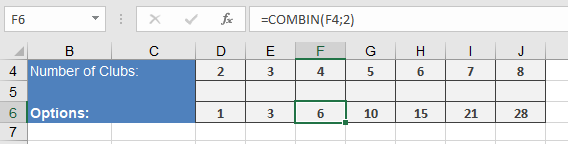
=COMBIN(4;2) → Returns 6 possible matches
Comparison with PERMUT():
| Function | Order Matters | Formula | Example (4,2) |
| COMBIN | No | n!/(k!(n-k)!) | 6 |
| PERMUT | Yes | n!/(n-k)! | 12 |
Applications:
- Probability calculations
- Tournament scheduling
- Statistical analysis
- Combinatorial mathematics
- Quality control sampling
Note: For large numbers (n > 170), consider alternative methods due to Excel’s factorial computation limits.