
This function calculates the factorial of a specified non-negative integer.
Syntax
FACT(number)
Argument
- number (required) – A non-negative integer (decimal values are truncated)
Key Properties:
- For any positive integer n:
n! = n × (n-1) × (n-2) × … × 2 × 1 - By definition: 0! = 1
- Maximum computable value in Excel: FACT(170) ≈ 7.26E+306
(Larger values return #NUM! error)
Mathematical Background
Factorials represent:
- Permutations of distinct items
- Partial products of natural numbers
- Fundamental in combinatorics and probability
Example Applications:
- Race Placement (Permutations)
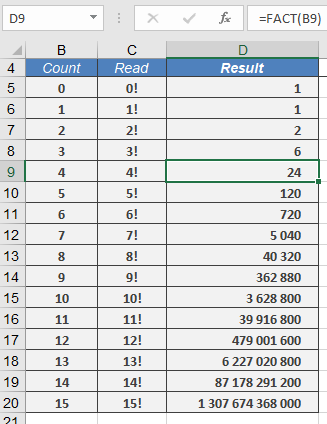
=FACT(4) → Returns 24
Interpretation: 4 runners can finish in 24 different orders
- Committee Arrangements
=FACT(5)/FACT(3) → Returns 20 (5P2 permutations)
- Special Cases:
| Formula | Result | Notes |
| =FACT(0) | 1 | Definition |
| =FACT(1) | 1 | |
| =FACT(5.9) | 120 | Truncates to 5 |
| =FACT(170) | 7.26E+306 | Excel’s limit |
Error Conditions:
- #VALUE! – Non-numeric input
- #NUM! – Negative numbers or n > 170