
This function rounds a number down to the nearest multiple of the specified significance value.
Syntax
FLOOR(number; significance)
Arguments
- number (required) – The numeric value to be rounded
- significance (required) – The rounding multiple
Key Behavior:
- Positive numbers: Rounds toward zero (down)
- Negative numbers: Rounds away from zero (up)
- Same sign requirement: Both arguments must be positive or both negative
- Exact multiples: Returns unchanged if number is already a multiple of significance
Error Conditions:
- #VALUE! – Non-numeric arguments
- #NUM! – When number and significance have opposite signs
Examples:
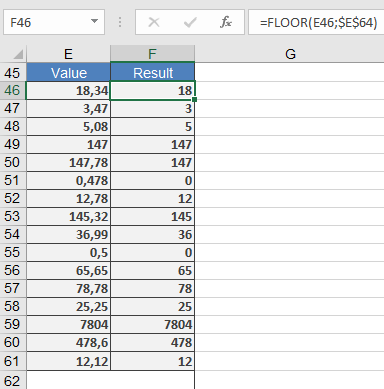
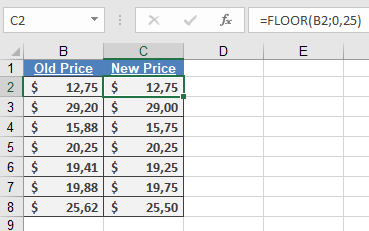
Comparison with Similar Functions:
| Function | Direction | Multiple-Based | Handles Negatives |
| FLOOR | Down | Yes | Yes (with same sign) |
| CEILING | Up | Yes | Yes |
| MROUND | Nearest | Yes | Yes |
| ROUNDDOWN | Down | No | Yes |
Applications:
- Price setting and discount calculations
- Time tracking (15-minute increments)
- Inventory management (case quantities)
- Financial reporting (standardized units)