
The With statement in VBA allows you to execute a series of instructions on a single object efficiently. By establishing the reference to the object once, you can repeatedly apply multiple properties or methods to it without repeating the full object path. This is especially useful when dealing with long object names, making the code clearer and easier to read.
The basic structure is:
With Object
    [Statements]
End With
Here is an example:
Sub WithStatementExample()
    With ThisWorkbook.Worksheets("Sheet1").Range("A1:A3")
        .Value = 12.8
        .NumberFormat = "0.000"
        .Font.Size = 24
        .Borders.Weight = xlThick
    End With
End Sub
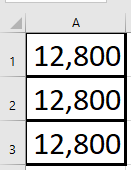
Explanation:
In this example, several properties of the range A1:A3 are changed within the With block. The value is set to 12.8, the number format is customized, the font size is enlarged, and the border thickness is set to a thick line.
Within the With block, each property or method reference begins with a dot (.), which clearly indicates that it belongs to the object specified after With. This shorthand avoids the need to repeat the full object reference in each line, improving both readability and performance.
Nested With Statements
You can also nest With statements to work with sub-objects or collections. To illustrate, the example from Section 2.4.19, “Sorting a Range with Multiple Keys”, has been rewritten as follows:
Sub NestedWithExample()
    ThisWorkbook.Worksheets("Sheet4").Activate
    With ActiveSheet.Sort
        With .SortFields
            .Clear
            .Add Range("A1:A5")
            .Add Range("B1:B5")
            .Add Range("C1:C5")
            .Add Range("D1:D5")
            .Add Range("E1:E5")
        End With
        .SetRange Range("A1:E6")
        .Apply
    End With
End Sub
Explanation:
- The outer With works with the Sort object of the active worksheet. This includes accessing the SortFields collection and calling methods like .SetRange and .Apply.
- The inner With operates on the SortFields collection itself, allowing you to call .Clear and .Add methods multiple times on this collection without repeating the full reference.
This nesting makes the code more concise and logically structured when working with complex object hierarchies.