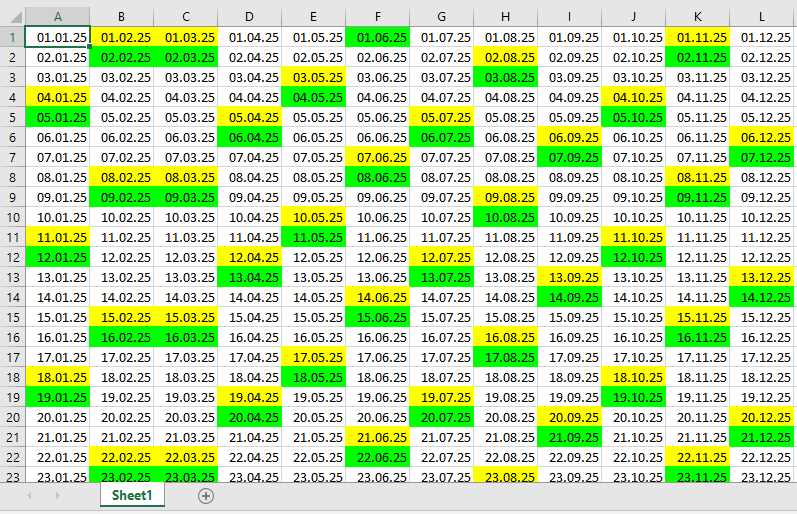
The previous example can be easily extended into a full annual calendar by adding two functions:
- The VBA function Day() to determine the day of the month
- The worksheet function EoMonth() to find the last day of a given month
Here is the code for the annual calendar:
Sub AnnualCalendar()
    Dim dayNum As Integer, monthNum As Integer, yearNum As Integer
    Dim currentDate As Date, firstOfMonth As Date
    Dim daysInMonth As Integer
    yearNum = Application.InputBox("Please enter a year:", Type:=1)
    ' Application.ScreenUpdating = False
    Workbooks.Add
    For monthNum = 1 To 12
        firstOfMonth = DateSerial(yearNum, monthNum, 1)
        daysInMonth = Day(WorksheetFunction.EoMonth(firstOfMonth, 0))
        For dayNum = 1 To daysInMonth
            currentDate = DateSerial(yearNum, monthNum, dayNum)
            Cells(dayNum, monthNum).Value = currentDate
            Cells(dayNum, monthNum).NumberFormat = "DD.MM.YY"
            If Weekday(currentDate) = 7 Then
                Cells(dayNum, monthNum).Interior.Color = vbYellow
            ElseIf Weekday(currentDate) = 1 Then
                Cells(dayNum, monthNum).Interior.Color = vbGreen
            End If
        Next dayNum
    Next monthNum
    ' Application.ScreenUpdating = True
End Sub
Explanation:
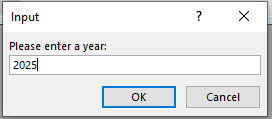
First, the user is prompted to enter a year, as shown in Figure.
The construction of the annual calendar may take a moment. You can speed up the process by turning off screen updating using Application.ScreenUpdating = False. For normal operation, remember to turn it back on (= True) at the end.
A new workbook is created to hold the annual calendar, which the user can save later in the desired location.
The outer loop cycles through all twelve months of the year.
For each month, DateSerial() generates the date of the first day of the month. This date is passed to the worksheet function EoMonth(), which returns the date of the last day of that month.
The Day() function extracts the day number from the last day of the month, which tells how many days that month contains. Similarly, Month() and Year() return the month and year components of a date.
The inner loop iterates over every day of the current month. Each date is created with DateSerial() and formatted into the corresponding cell.
As in the previous example, weekends are highlighted using the Weekday() function — Saturdays in yellow, Sundays in green.