
The worksheet function NetworkDays() calculates the number of workdays within a specified period. Workdays exclude weekends — Saturdays and Sundays — and can also exclude a user-defined list of holidays or vacation days.
Since Excel 2010, an international version called NetworkDays_Intl() is available. This allows you to define which days of the week count as weekends. These can be Saturdays and Sundays, or any other days you specify.
The worksheet function WorkDay() calculates the date of a workday based on a given start date. You can specify how many workdays in the future or past you want to move, e.g., the fourth next workday or the third last workday. Like NetworkDays(), weekends, holidays, and vacation days are excluded.
Since Excel 2010, the international counterpart WorkDay_Intl() lets you define weekend days similarly to NetworkDays_Intl().
The following procedure, Workdays(), calculates the number of workdays in the period from January 1, 2025, to January 31, 2025. It also calculates the fourth next workday starting from January 3, 2025. The holidays are assumed to be from January 6 to January 8, 2025, inclusive. Additionally, January 1, 2025, is considered a workday.
Sub Workdays()
    Dim count As Integer
    Dim dt As Date
    Dim msg As String
    ThisWorkbook.Worksheets("Sheet1").Activate
    count = WorksheetFunction.NetworkDays( _
        Range("G1").Value, Range("G31").Value, Range("G6:G8"))
    msg = msg & "Number of workdays: " & count & vbCrLf
    count = WorksheetFunction.NetworkDays_Intl( _
        Range("G1").Value, Range("G31").Value, 11, Range("G6:G8"))
    msg = msg & "Number of workdays (Intl): " & count & vbCrLf
    dt = WorksheetFunction.WorkDay( _
        Range("G3").Value, 4, Range("G6:G8"))
    msg = msg & "Fourth next workday: " & dt & vbCrLf
    dt = WorksheetFunction.WorkDay_Intl( _
        Range("G3").Value, 4, 11, Range("G6:G8"))
    msg = msg & "Fourth next workday (Intl): " & dt & vbCrLf
    MsgBox msg
End Sub
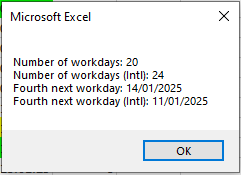
Explanation of Calculation and Result:
The first two parameters of NetworkDays() are the start and end dates. The third parameter is the range containing holidays and vacation days.
In this example, cells G1 to G31 contain dates for January (31 days). Subtracting four Saturdays, four Sundays, and three vacation days results in 20 workdays.
In the international version NetworkDays_Intl(), the third parameter (11) defines weekend days — here, only Sundays. The four Saturdays are counted as workdays, resulting in 24 workdays.
The first two parameters of WorkDay() specify the start date and the number of workdays to offset (positive or negative). The third parameter lists holidays and vacation days.
Starting from January 3, 2025, the next workdays are: January 9, 10, 13, and 14.
In WorkDay_Intl(), the third parameter (11) similarly defines Sunday as the only weekend day. Starting from January 3, 2025, the next workdays are: January 4, 9, 10, and 11.