
The VBA function DateAdd() adds a time interval to a given time. The function DateDiff() calculates the time interval as the difference between two time values. The time interval can be either positive or negative.
Here is an example:
Sub TimeCalculation()
    Dim t As Date
    Dim interval As Integer
    ' Set the initial time
    t = "06/09/2025 15:38:25"
    ' Activate Sheet1 and apply formatting
    ThisWorkbook.Worksheets("Sheet1").Activate
    Range("E1:E2").NumberFormat = "mm/dd/yyyy hh:mm:ss"
    ' Store initial time in E1
    Range("E1").Value = t
    ' Add 5 minutes
    t = DateAdd("n", 5, t)
    ' Subtract 50 seconds
    t = DateAdd("s", -50, t)
    ' Store modified time in E2
    Range("E2").Value = t
    ' Calculate the interval in seconds between the two times
    interval = DateDiff("s", Range("E1").Value, Range("E2").Value)
    Range("E3").Value = interval
End Sub
Explanation:
A time value with both the date and time is stored in the time variable.
Using the DateAdd() function, a time interval is added to this time value. The first parameter specifies the unit of the time interval. The following options are available:
- yyyy: Year
- q: Quarter
- m: Month
- y: Day of the year
- d: Day
- w: Weekday
- ww: Week
- h: Hour
- n: Minute
- s: Second
The second parameter is the value of the time interval, and the third parameter is the original time value to which the interval will be added.
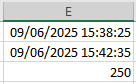
In this example, 5 minutes are added first, and then 50 seconds are subtracted. The time 15:38:25 is first adjusted to 15:43:25, and then it becomes 15:42:35. The cells with the time values are appropriately formatted.
The DateDiff() function calculates the difference between two time values as a time interval. The first parameter also specifies the unit of the time interval. To calculate the result, the second parameter’s time value is subtracted from the third parameter’s time value.
In this example, the difference is 4 minutes and 10 seconds, which equals 250 seconds.