
The procedure OnErrorInstruction() is an improved version of the previous RuntimeError() procedure, featuring error handling:
Sub OnErrorInstruction()
    Dim x As Integer, y As Integer, z As Integer
    ThisWorkbook.Worksheets("Sheet1").Activate
    On Error GoTo Error  ' Set error handler
    x = Range("A1").Value
    y = Range("A2").Value
    z = x / y
    Range("A3").Value = z
    Range("A4").Value = "Done"
    Exit Sub  ' Exit before error handler
Error:  ' Error handler label
    MsgBox Err.Description
    Resume Next  ' Continue execution with next statement
End Sub
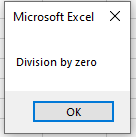
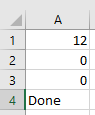
The output in the case of 12 and 0 ist:
Explanation:
- The statement On Error GoTo Fehler instructs VBA to jump to the line labeled Fehler: if a runtime error occurs anywhere in the procedure.
- The label Fehler: is defined by the name followed by a colon.
- When an error happens, the Err object is populated with information about the error.
- You can display Err.Description to show the error message in a message box.
- Unlike the previous example, the program does not terminate upon encountering the error and continues running.
Additional Details:
- The statement Exit Sub is used to exit the procedure early, so the error handler code is not executed unless an error occurs. Without it, the code after the label Fehler: would always run, even if no error happened.
- The statement Resume Next causes execution to continue with the statement immediately after the one that caused the error.
Example of cascading errors:
- If cell A2 contains the text « abc », the first error is a Type Mismatch because the text cannot be assigned to the integer variable y. The error message appears, but due to Resume Next, the program continues with the next line.
- Since y retains its default value of 0, the subsequent division triggers a Division by Zero error, which is also caught and displayed.