
Comparison operators are used in conditions, which are essential for controlling program flow with branching (e.g., If statements) and loops. Branching works on the same principle as Excel’s IF() function.
The result of a comparison is one of the two Boolean values: True or False. lists the common comparison operators:
| Operator | Description |
| < | Less than |
| <= | Less than or equal to |
| > | Greater than |
| >= | Greater than or equal to |
| = | Equal to |
| <> | Not equal to |
Examples:
| Expression | Result |
| 5 > 3 | True |
| 3 = 3.2 | False |
| 5 + 3 * 2 >= 12 | False |
The Like Operator
In addition, VBA supports the Like operator for pattern matching. You can use wildcards such as:
- * (asterisk) for zero or more characters
- ? (question mark) for exactly one character
| Expression | Result |
| « abxba » Like « a*a » | True |
| « abxba » Like « a?a » | False |
| « aba » Like « a?a » | True |
| « asdlfigc » Like « a?d?f*c » | True |
The Like operator allows you to perform much more complex pattern matching than shown here.
Example Procedure Using Comparison Operators:
Sub ComparisonOperators()
    ThisWorkbook.Worksheets("Sheet1").Activate
    Range("E1").Value = (5 > 3)
    Range("E2").Value = (3 = 3.2)
    Range("E3").Value = (5 + 3 * 2 >= 12)
    Range("F1").Value = ("abxba" Like "a*a")
    Range("F2").Value = ("abxba" Like "a?a")
    Range("F3").Value = ("aba" Like "a?a")
    Range("F4").Value = ("asdlfigc" Like "a?d?f*c")
End Sub
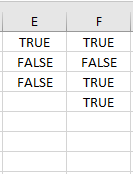
Note: Parentheses around comparison expressions are not necessary for correct evaluation; they are included here only to improve readability.