
A connector provides a flexible link between two graphic objects. When one or both of these objects change position or size, the connector’s properties adjust accordingly. The connection can originate from one of several possible connection points on an object. Typically, it is desirable for the connection points on both objects to be as close to each other as possible.
In the following example, two rectangles are first created. Then, these two shapes are connected by a straight connector. Rectangles have four possible connection points, each located at the midpoint of their four sides.
Sub CreateConnector()
    Dim Sh1 As Shape, Sh2 As Shape
    Dim Con As Shape
    ThisWorkbook.Worksheets("Sheet3").Activate
    ' Shapes to be connected
    Set Sh1 = ActiveSheet.Shapes.AddShape(msoShapeRectangle, 80, 130, 40, 30)
    Set Sh2 = ActiveSheet.Shapes.AddShape(msoShapeRectangle, 180, 100, 40, 30)
    ' Connector
    Set Con = ActiveSheet.Shapes.AddConnector(msoConnectorStraight, 1, 1, 1, 1)
    Con.Line.Weight = 3
    Con.ConnectorFormat.BeginConnect Sh1, 1
    Con.ConnectorFormat.EndConnect Sh2, 1
    Con.RerouteConnections
    ' Colors
    Sh1.Fill.ForeColor.RGB = RGB(91, 155, 213)
    Sh2.Fill.ForeColor.RGB = RGB(91, 155, 213)
    Con.Line.ForeColor.RGB = RGB(91, 155, 213)
    Set Con = Nothing
    Set Sh1 = Nothing
    Set Sh2 = Nothing
End Sub
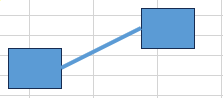
Explanation:
The AddConnector() method creates a connector, returning an object of type Shape.
The first parameter specifies the connector type, which is a value from the msoConnectorType enumeration. Here, msoConnectorStraight indicates a straight connector.
The next four parameters define the starting point (BeginX, BeginY) and ending point (EndX, EndY) coordinates of the connector, similar to a line. However, once the connector is connected, these values are overridden by the positions of the connected objects. Thus, only nonzero placeholder values are required here.
Additional line properties such as Weight (line thickness) can be set for the connector.
The actual connection is made using the BeginConnect() and EndConnect() methods of the ConnectorFormat property. Both methods take two parameters:
- The first parameter is the shape to connect to.
- The second parameter is the index number of the connection point on that shape.
As noted, it is generally desirable for the connection points on the two objects to be as close as possible. Therefore, placeholder nonzero values suffice initially.
The RerouteConnections() method automatically adjusts the connector to use the optimal connection points between the two shapes.