
A variety of worksheet functions assist in converting between different number systems (decimal, hexadecimal, binary, and octal). Their operation is demonstrated here with the functions Dec2Bin() and Dec2Hex():
Sub BinaryHexadecimal()
    Dim i As Integer
    ThisWorkbook.Worksheets("Sheet2").Activate
    For i = 1 To 10
        Cells(i, 3).Value = Application.WorksheetFunction.Dec2Bin(Cells(i, 2).Value)
        Cells(i, 4).Value = Application.WorksheetFunction.Dec2Hex(Cells(i, 2).Value)
    Next i
    Range("D1:D10").NumberFormat = "x@"
    Range("D1:D10").HorizontalAlignment = xlRight
End Sub
Explanation:
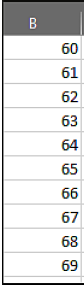
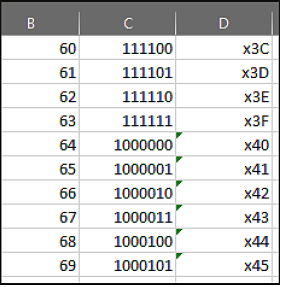
Decimal numbers from 60 to 69, previously entered in column B, are converted.
Within a loop, the results of the conversion function Dec2Bin() are written into column C, and the results of Dec2Hex() are written into column D.
The function Dec2Bin() can only convert decimal values up to 511.
Hexadecimal digits are treated as text in Excel. For clearer identification as hexadecimal numbers, the values in column D are prefixed with “x” and right-aligned.
Using the property NumberFormatLocal, the format @ is applied. This format represents the cell’s text value. Thus, the displayed format shows an “x” followed by the cell’s value.