
As you know, worksheet cells can contain strings or numbers. Numbers may also be formatted as dates. You can store cell contents in variables of the appropriate data type if you recognize their type or formatting.

To identify the type, you can use the functions IsNumeric() and IsDate(). For conversion, use the functions CDbl() and CDate(). Here is an example:
Sub ConvertStrings()
    Dim x As Double
    Dim d As Date
    Dim s As String
    Dim i As Integer
    ThisWorkbook.Worksheets("Sheet1").Activate
    For i = 1 To 4
        If IsNumeric(Cells(i, 2).Value) Then
            x = CDbl(Cells(i, 2).Value)
            Cells(i, 3).Value = x
            Cells(i, 4).Value = "Number"
        ElseIf IsDate(Cells(i, 2).Value) Then
            d = CDate(Cells(i, 2).Value)
            Cells(i, 3).Value = d
            Cells(i, 4).Value = "Date"
        Else
            s = Cells(i, 2).Value
            Cells(i, 3).Value = s
            Cells(i, 4).Value = "String"
        End If
    Next i
End Sub
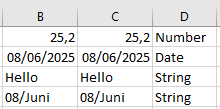
Explanation:
Assume the values shown in Figure 8.23 are in cells B1 to B4. The date in cell B4 was previously formatted.
If the function IsNumeric() determines the cell content is a number, it is converted to a Double variable using CDbl().
If IsDate() finds the content to be a date, it is converted to a Date variable using CDate().
Otherwise, the cell content is assigned to a string variable.
The application can then continue working with variables of the correct data type, and—for example—output them again into a worksheet.