
The worksheet functions Count() and CountBlank() are useful when you want to determine how many cells in a range contain numbers (including dates) or are empty.
Sub CountCells()
    ThisWorkbook.Worksheets("Sheet1").Activate
    Range("B6").Value = Application.WorksheetFunction.Count(Range("B1:B5"))
    Range("B7").Value = Application.WorksheetFunction.CountBlank(Range("B1:B5"))
End Sub
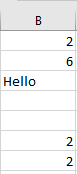
Explanation:
The Count() function returns how many cells in the range B1 to B5 contain numbers or dates; in this example, it returns 3.
The CountBlank() function counts the number of empty cells in the range B1 to B5; here, it returns the count of blank cells.