
The function DateSerial() is used to create a date, while the function Weekday() determines the day of the week for a given date. Below, these two functions are used to highlight weekend days specifically:
Sub HighlightWeekend()
    Dim i As Integer
    Dim currentDate As Date
    ThisWorkbook.Worksheets("Sheet1").Activate
    For i = 1 To 31
        currentDate = DateSerial(2025, 1, i)   ' Create a date for January 2025
        Cells(i, 7).Value = currentDate         ' Put the date in column G (7th column)
        Cells(i, 7).NumberFormat = "ddd. dd.mm.yy" ' Format the date display
        If Weekday(currentDate, vbSunday) = 7 Then
            Cells(i, 7).Interior.Color = vbYellow  ' Highlight Saturdays in yellow
        ElseIf Weekday(currentDate, vbSunday) = 1 Then
            Cells(i, 7).Interior.Color = vbGreen   ' Highlight Sundays in green
        Else
            Cells(i, 7).Interior.Pattern = xlNone   ' No fill for weekdays
        End If
    Next i
End Sub
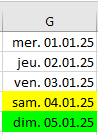
Explanation:
All dates of January 2020 are listed vertically. A loop runs from 1 to 31 to generate each day.
Inside the loop, the DateSerial() function constructs a date using three parameters: year, month, and day.
The date is formatted using the NumberFormatLocal property.
The Weekday() function returns an integer representing the day of the week: 1 = Sunday, 2 = Monday, …, 7 = Saturday.
In this example, Saturdays and Sundays are highlighted with yellow and green fill colors, respectively.