
The following program inserts the picture from the previous example multiple times at a reduced size of 100 × 75 points. Different parts of the images are cropped. The crop values must relate to the original image size of 288 × 216 points. For example, to display only the left or right half of the image, a crop value of 144 points is required.
Sub CropPictures()
    Dim Sh(1 To 6) As Shape
    Dim X As Shape
    Dim FilePath As String
    Dim i As Integer
    ThisWorkbook.Worksheets("Sheet10").Activate
    FilePath = ThisWorkbook.Path & "C:\Users\POPOLY\Desktop\fleur.jpeg"
    ' Delete all existing shapes
    For Each X In ActiveSheet.Shapes
        X.Delete
    Next X
    ' Insert images and crop different parts
    Set Sh(1) = ActiveSheet.Shapes.AddPicture(FilePath, msoFalse, msoTrue, 10, 10, 100, 75)
    Set Sh(2) = ActiveSheet.Shapes.AddPicture(FilePath, msoFalse, msoTrue, 10, 95, 100, 75)
    Sh(2).PictureFormat.CropLeft = 144 ' Crop left half
    Set Sh(3) = ActiveSheet.Shapes.AddPicture(FilePath, msoFalse, msoTrue, 10, 180, 100, 75)
    Sh(3).PictureFormat.CropRight = 144 ' Crop right half
    Set Sh(4) = ActiveSheet.Shapes.AddPicture(FilePath, msoFalse, msoTrue, 120, 10, 100, 75)
    Sh(4).PictureFormat.CropTop = 108 ' Crop top half
    Set Sh(5) = ActiveSheet.Shapes.AddPicture(FilePath, msoFalse, msoTrue, 230, 10, 100, 75)
    Sh(5).PictureFormat.CropBottom = 108 ' Crop bottom half
    Set Sh(6) = ActiveSheet.Shapes.AddPicture(FilePath, msoFalse, msoTrue, 230, 180, 100, 75)
    Sh(6).PictureFormat.CropRight = 144 ' Crop right half
    Sh(6).PictureFormat.CropBottom = 108 ' Crop bottom half
    ' Output properties for overview
    Cells(1, 8).Value = "Number"
    Cells(1, 9).Value = "Left"
    Cells(1, 10).Value = "Top"
    Cells(1, 11).Value = "Width"
    Cells(1, 12).Value = "Height"
    For i = 1 To 6
        Cells(i + 1, 8).Value = i
        Cells(i + 1, 9).Value = Sh(i).Left
        Cells(i + 1, 10).Value = Sh(i).Top
        Cells(i + 1, 11).Value = Sh(i).Width
        Cells(i + 1, 12).Value = Sh(i).Height
        Set Sh(i) = Nothing
    Next i
End Sub
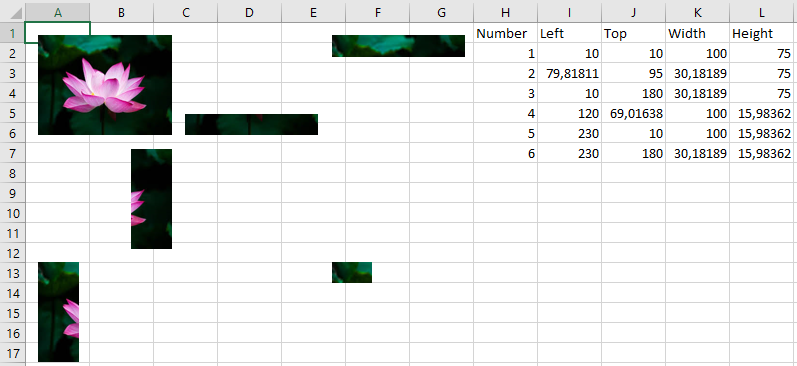
Explanation:
References to the six picture objects are stored in an array.
The file path is assigned, and all existing shapes on the worksheet are deleted.
The first picture object is inserted at the top-left and is not cropped. It serves as a reference for comparison with the other five pictures.
The PictureFormat property of a Shape object allows manipulation of the picture, including cropping.
The second picture is inserted below the first, with the left half cropped (CropLeft = 144).
The third picture is inserted below the second, cropping the right half (CropRight = 144).
The fourth picture is placed to the right of the first, cropping the top half (CropTop = 108).
The fifth picture is placed right of the fourth, cropping the bottom half (CropBottom = 108).
The sixth picture is placed at the bottom right, cropping both the right half and bottom half (CropRight = 144 and CropBottom = 108), leaving only the upper-left quarter visible.