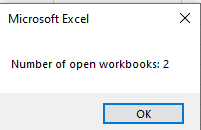
The following VBA procedure shows how to determine the number of Excel workbooks currently open:
Sub CountWorkbooks()
    MsgBox "Number of open workbooks: " & Workbooks.Count
End Sub
Explanation:
This procedure retrieves the value of the Count property from the Workbooks collection. The Count property returns a numerical value indicating how many workbooks are currently open in Excel.
The result is then displayed in a message box using the MsgBox() function. This is a simple yet effective way to monitor the number of active workbooks during the execution of your macros.
Important Note:
The count also includes hidden workbooks, such as the Personal Macro Workbook (usually named Personal.xlsb), if it is open. This special workbook is often used to store macros that are available globally across all workbooks. You can verify its presence by checking the Project Explorer in the VBA Editor (VBE).
Illustration Note:
From this point on in the source material, message box titles and the OK button will no longer be shown in figure illustrations for simplicity.