In addition to the well-known worksheet functions Max() and Min(), which find the largest and smallest values in a range, there are also the functions Large() and Small(). These allow you to find the k-th largest or k-th smallest value in a range — for example, when k = 2, the second largest or second smallest value.
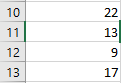
Below is an example demonstrating all four functions. The range contains the numbers 5, 8, 3, and 16:
Sub FindValues()
    ThisWorkbook.Worksheets("Sheet1").Activate
    With WorksheetFunction
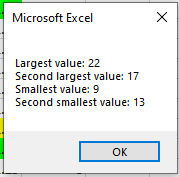
        MsgBox "Largest value: " & .Max(Range("A10:A13")) & vbCrLf & _
               "Second largest value: " & .Large(Range("A10:A13"), 2) & vbCrLf & _
               "Smallest value: " & .Min(Range("A10:A13")) & vbCrLf & _
               "Second smallest value: " & .Small(Range("A10:A13"), 2)
    End With
End Sub
Explanation:
For the functions Large() and Small(), the parameter k is specified as the second argument.
The program output is shown in Figure.