
The For Each … In … Next loop is used to iterate over collections or arrays. In Excel’s object hierarchy, there are many such collections, for example, Workbooks and Worksheets.
Below is an example using the Workbooks collection, which represents the list of all open Excel workbooks:
Sub ForEachWorkbook()
    Dim WB As Workbook
    Dim Output As String
    Output = "Workbooks: "
    For Each WB In Workbooks
        Output = Output & WB.Name & " "
    Next WB
    MsgBox Output
    Set WB = Nothing
End Sub

Explanation:
- First, the variable WB is declared as a reference to an object of type Workbook.
- The line For Each WB In Workbooks begins the loop. Each element in the Workbooks collection is iterated over.
- Within the For Each loop, the current element is automatically assigned to the variable WB. There is no need to assign it explicitly with Set.
- In this example, the name of each currently opened workbook is concatenated to the output string.
- The Next WB statement advances the loop to the next element. Writing the variable name after Next is optional but can improve readability.
Here is another example using the Worksheets collection, which represents all worksheets in the current workbook:
Sub ForEachWorksheet()
    Dim WS As Worksheet
    Dim Output As String
    Output = "Worksheets: "
    For Each WS In ThisWorkbook.Worksheets
        Output = Output & WS.Name & " "
    Next WS
    MsgBox Output
    Set WS = Nothing
End Sub
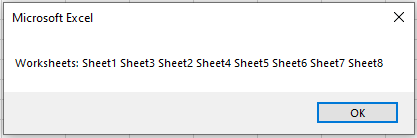
Explanation:
- The variable WS is declared as a reference to a Worksheet object.
- The Worksheets collection of the current workbook is iterated through.
- Within the loop, the current worksheet is referred to by WS.
- The worksheet names are concatenated into a string that is then displayed in a message box.ob