
A freeform shape is a path composed of straight or curved line segments connecting vertices (called nodes). If the last node coincides with the first, the freeform is closed, creating an enclosed area.
The method BuildFreeform() creates a FreeformBuilder object starting with the first node. Additional nodes are added with AddNodes(). Finally, ConvertToShape() converts the freeform into a Shape object.
Two examples follow: a closed freeform and an open freeform polyline.
Closed Freeform Example:
Sub ClosedFreeform()
    Dim FB As FreeformBuilder
    Dim Sh As Shape
    ThisWorkbook.Worksheets("Sheet3").Activate
    ' Initialize freeform with first node
    Set FB = ActiveSheet.Shapes.BuildFreeform(msoEditingAuto, 330, 30)
    ' Add curved nodes
    FB.AddNodes msoSegmentCurve, msoEditingAuto, 390, 60
    FB.AddNodes msoSegmentCurve, msoEditingAuto, 390, 120
    FB.AddNodes msoSegmentCurve, msoEditingAuto, 430, 40
    ' Close the freeform by returning to the first node
    FB.AddNodes msoSegmentCurve, msoEditingAuto, 330, 30
    ' Convert freeform to shape and format
    Set Sh = FB.ConvertToShape
    Sh.Line.Weight = 3
    Sh.Fill.ForeColor.RGB = RGB(91, 155, 213)
    Sh.Line.ForeColor.RGB = RGB(65, 113, 156)
    Set Sh = Nothing
    Set FB = Nothing
End Sub

Explanation of Closed Freeform:
The method BuildFreeform() requires three parameters:
- EditingType: defines the editing behavior of the first node and must be a value from the msoEditingType enumeration. The value msoEditingAuto means the editing mode adapts automatically to connected segments, providing a universal setting.
- X1 and Y1: specify the coordinates of the first node.
The AddNodes() method requires at least four parameters:
- SegmentType: defines the type of connection to the new node, from the msoSegmentType enumeration. Possible values include msoSegmentCurve for curved segments and msoSegmentLine for straight lines.
- EditingType: as described above.
- The next two parameters specify the coordinates of the new node when EditingType is set to msoEditingAuto.
The method ConvertToShape() converts the built freeform into a Shape, which can then be manipulated with standard shape properties and methods, such as Line.Weight for line thickness.
Open Freeform Polyline Example:
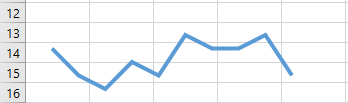
The node coordinates are taken from the worksheet (see Figure 7.16).
Sub OpenFreeformPolyline()
    Dim FB As FreeformBuilder
    Dim Sh As Shape
    Dim i As Integer
    ThisWorkbook.Worksheets("Sheet3").Activate
    ' Initialize freeform with first node from cells I1 (col 9), J1 (col 10)
    Set FB = ActiveSheet.Shapes.BuildFreeform(msoEditingAuto, Cells(1, 9), Cells(1, 10))
    ' Add line segments for nodes in rows 2 to 10
    For i = 2 To 10
        FB.AddNodes msoSegmentLine, msoEditingAuto, Cells(i, 9), Cells(i, 10)
    Next i
    ' Convert freeform to shape and format
    Set Sh = FB.ConvertToShape
    Sh.Line.Weight = 3
    Sh.Line.ForeColor.RGB = RGB(91, 155, 213)
    Set Sh = Nothing
    Set FB = Nothing
End Sub
Explanation:
The coordinates for the first node come from the first row of the specified columns, and subsequent nodes come from the rows below. The connection type used here is a straight line (msoSegmentLine).