
Functions in VBA have the following simplified structure:
Function FunctionName(ParameterList) As Type
    [ InstructionBlock ]
    [ Exit Function ]
    [ InstructionBlock ]
End Function
- Like procedures, a function name is followed by a parameter list in parentheses.
- Every function has a specific data type declared after As.
- Functions are generally used to calculate a value and return it by assigning that value to the function’s name inside the code.
- The returned value can be stored in a variable or used directly.
- The statement Exit Function can be used to leave the function immediately under special conditions.
- When using the return value of a function, parentheses are required around the parameter list, for example:
Variable = FunctionName(ParameterList)
- If the return value is not used, parentheses are omitted:
FunctionName ParameterList
Note:
Custom functions can be used both inside VBA and directly in Excel worksheets using
=FUNCTIONNAME()
They appear in the User Defined category in Excel.
Example: Maximum Value Function
The function MaxValue() is called to calculate the maximum of two parameters and return the result to the calling procedure:
Sub FunctionsExample()
    Dim a As Integer, b As Integer, c As Integer
    a = 12
    b = 17
    c = MaxValue(a, b)
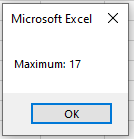
    MsgBox "Maximum: " & c
End Sub
Function MaxValue(x As Integer, y As Integer) As Integer
    If x > y Then
        MaxValue = x
    Else
        MaxValue = y
    End If
End Function
Explanation:
- When c = MaxValue(a, b) is executed:
- The function MaxValue() is called with two numbers.
- Inside the function, a conditional checks which of the two is larger.
- The function assigns the maximum to its own name, which becomes the return value.
- Control returns to the caller, where the returned value is assigned to c.
- Finally, c is displayed.
- If you only called MaxValue(a, b) without assigning its return value, all calculations would still happen but the result would be discarded — a common beginner mistake.
- This function can also be used directly in an Excel worksheet, for example entering =MaxValue(A1;B1) in a cell will return the maximum of those cells.
Additional Example: Operator Precedence in a Function
The function LastDayInMonth() calculates the last day of a given month in a given year, taking leap years into account:
Sub TestLastDayInMonth()
    ThisWorkbook.Worksheets("Sheet2").Activate
    Range("D3").Value = LastDayInMonth(Range("D1").Value, Range("D2").Value)
End Sub
Function LastDayInMonth(J As Integer, M As Integer) As Integer
    If M = 2 Then
        If J Mod 4 = 0 And J Mod 100 <> 0 Or J Mod 400 = 0 Then
            LastDayInMonth = 29
        Else
            LastDayInMonth = 28
        End If
    ElseIf M = 4 Or M = 6 Or M = 9 Or M = 11 Then
        LastDayInMonth = 30
    Else
        LastDayInMonth = 31
    End If
End Function
Explanation:
- The function takes the year J and month M as parameters.
- For February (M = 2), it checks for leap years using the Mod operator and logical operators And and Or.
- Leap year rules:
- Divisible by 4 but not by 100, or divisible by 400.
- For April, June, September, November, it returns 30.
- For all other months, it returns 31.
Operator Precedence in the Expression:
J Mod 4 = 0 And J Mod 100 <> 0 Or J Mod 400 = 0
The order of operations is:
- Arithmetic Mod
- Comparison =, <>
- Logical And
- Logical Or
No parentheses are needed due to this precedence.
Usage in Excel:
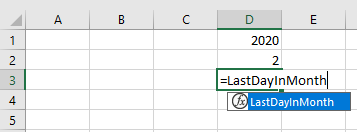
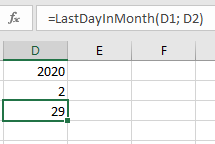
- The function LastDayInMonth() can also be used in an Excel worksheet.
- As you type, Excel suggests the function.
- The formula bar shows the function formula after input.