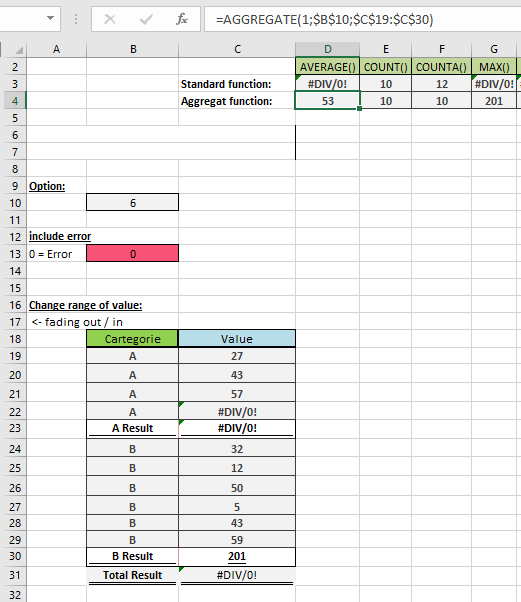
This function returns an aggregate calculation from a list or database.
Syntax. This function has two forms:
AGGREGATE(function_num; options; ref1; [ref2]; …) (reference form)
AGGREGATE(function_num; options; array; [k]) (array form)
Arguments
- function_num (required)
A number between 1 and 19 that specifies the aggregation function (see Table 1).
Table 1. Function Numbers and Corresponding Functions
| function_num | Function |
| 1 | AVERAGE() |
| 2 | COUNT() |
| 3 | COUNTA() |
| 4 | MAX() |
| 5 | MIN() |
| 6 | PRODUCT() |
| 7 | STDEV.S() |
| 8 | STDEV.P() |
| 9 | SUM() |
| 10 | VAR.S() |
| 11 | VAR.P() |
| 12 | MEDIAN() |
| 13 | MODE.SNGL() |
| 14 | LARGE() |
| 15 | SMALL() |
| 16 | PERCENTILE.INC() |
| 17 | QUARTILE.INC() |
| 18 | PERCENTILE.EXC() |
| 19 | QUARTILE.EXC() |
- options (required)
A numerical value that determines which values to ignore (see Table 2).
Table 2. Option Values and Behaviors
| option | Behavior |
| 0 | Ignores nested SUBTOTAL()/AGGREGATE() |
| 1 | Ignores hidden rows + nested functions |
| 2 | Ignores errors + nested functions |
| 3 | Ignores hidden rows, errors, nested functions |
| 4 | Ignores nothing |
| 5 | Ignores hidden rows only |
| 6 | Ignores errors only |
| 7 | Ignores hidden rows and errors |
- ref1 (required for reference form)
The first numeric argument or range for aggregation. - ref2/k (optional)
- Reference form: Additional arguments (up to 253).
- Array form: Required for:
- LARGE(array, k)
- SMALL(array, k)
- PERCENTILE.INC(array, k)
- QUARTILE.INC(array, quart)
- PERCENTILE.EXC(array, k)
- QUARTILE.EXC(array, quart)
Background. The AGGREGATE() function is a powerful tool introduced in Excel to overcome limitations of other functions. Unlike standard functions that return errors for invalid references, AGGREGATE() provides flexible control over hidden cells and error handling without complex IFERROR() workarounds. It can calculate ranges containing subtotals while excluding them from results (see Figure below).
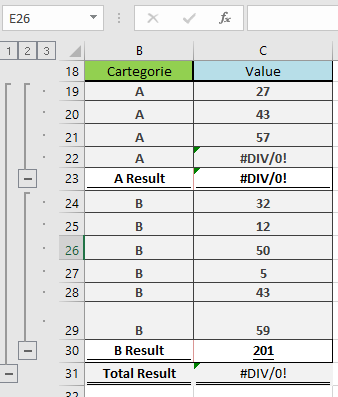
Example. the figure below show an example on aggregate function in excel