
This function calculates the depreciation amount for an asset in a given period using the French accounting system (degressive depreciation with a switch to linear). The result is rounded to an integer.
Syntax
AMORDEGRC(Cost; Date; First_Period; Residual_Value; Period; Rate; Basis)
Arguments
- Cost (required) – Purchase cost of the asset (including incidental expenses, minus discounts).
- Must be a positive number; otherwise, #VALUE! or #NUMBER! errors occur.
- Date (required) – The purchase date (start of depreciation).
- First_Period (required) – The end date of the first depreciation period (assigned period number 0).
- Residual_Value (required) – Expected remaining value after depreciation.
- Must be less than Cost and non-negative; otherwise, #NUMBER! is returned.
- Period (required) – The time period for which depreciation is calculated (integer ≥ 0).
- Rate (required) – The depreciation rate (initially linear, then degressive).
- Basis (optional) – Day-count method (see Table 1 below).
Table 1: Day-Count Methods
| Basis | Method | Description |
| 0 | 30/360 (NASD) | Months = 30 days; years = 360 days. Adjusts 31st to 30th. |
| 1 | Exact/Exact | Actual days per month/year. |
| 2 | Exact/360 | Actual days/month; year = 360 days. |
| 3 | Exact/365 | Actual days/month; year = 365 days. |
| 4 | 30/360 (European) | Months = 30 days; years = 360 days. Converts 31st to 30th. |
Background
- Depreciation reflects the asset’s value loss (not physical wear).
- The Rate is first treated as linear (e.g., 10% = 10-year lifespan).
- Degressive weighting is applied based on the rate:
- Factor 1.5 if Rate > 25% (3–4 years).
- Factor 2 if 16.66% ≤ Rate ≤ 25% (5–6 years).
- Factor 2.5 if Rate < 16.67% (>6 years).
- Residual value handling:
- If residual = 0, the last two periods split the remaining value.
- If residual > 0, depreciation stops when book value ≤ residual.
Example
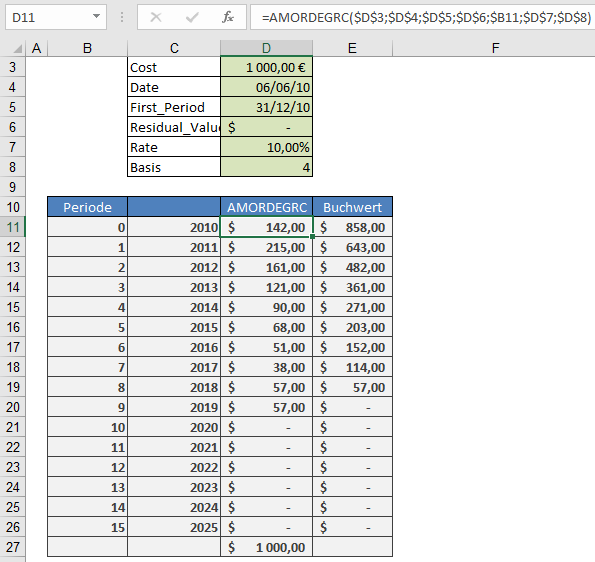
An asset is purchased on June 6, 2010, for $1,000, with:
- Depreciation rate: 10%
- Residual value: $142
- First period ends: December 31, 2010
Formula
=AMORDEGRC(1000; « 6/6/2010 »; « 12/31/2010 »; 142; 0; 10%; 4)
Manual Calculation
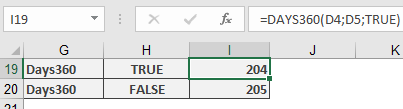
- Days in first period:
=DAYS360(« 6/6/2010 »; « 12/31/2010 »; TRUE) → 204 days
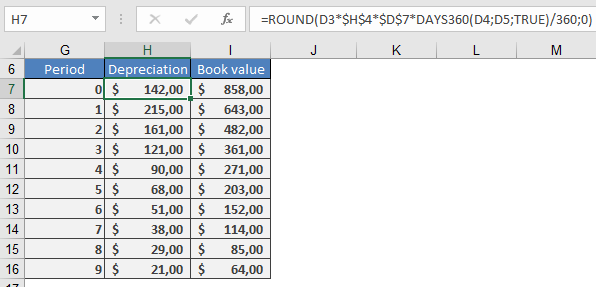
- Depreciation:
=ROUND(1000 × 10% × 2.5 × (204/360); 0) → $142 (matches AMORDEGRC).
Subsequent Periods
- Multiply the previous book value by 10% × 2.5.