
This function calculates the linear depreciation of an asset for a specified period, following the French accounting system. Unlike AMORDEGRC() (which uses degressive depreciation), AMORLINC() applies a straight-line method, making it adaptable to other tax jurisdictions with minor adjustments.
Syntax
AMORLINC(Cost; Date; First_Period; Residual_Value; Period; Rate; Basis)
Arguments
Table 1
| Argument | Description |
| Cost (required) | Total purchase cost (including expenses, minus discounts). Must be positive; otherwise, returns #VALUE! or #NUMBER!. |
| Date (required) | Asset purchase date (depreciation start date). |
| First_Period (required) | End date of the first depreciation period (assigned period 0). |
| Residual_Value (required) | Expected remaining value post-depreciation. Must be ≤ Cost and non-negative; otherwise, returns #NUMBER!. |
| Period (required) | Depreciation period (integer ≥ 0). |
| Rate (required) | Annual depreciation rate (e.g., 10% for 10 years, 20% for 5 years). |
| Basis (optional) | Day-count method (see Table 2 below). Default varies by region. |
Table 2: Day-Count Methods
| Basis | Method | Description |
| 0 | 30/360 (NASD) | 30-day months, 360-day year. Adjusts 31st to 30th. |
| 1 | Exact/Exact | Actual days per month/year. |
| 2 | Exact/360 | Actual days/month; year = 360 days. |
| 3 | Exact/365 | Actual days/month; year = 365 days. |
| 4 | 30/360 (European) | 30-day months; converts 31st to 30th. |
Key Notes
- First Period (Period 0):
- Depreciation is prorated based on days counted (per Basis).
- Example: Purchase in October → First period covers October–December.
- Residual Value Handling:
- If residual = 0: Depreciation may extend beyond the planned periods to account for partial-year start.
- If residual > 0: Depreciation stops when book value ≤ residual.
- Tax Law Adaptations:
- For German tax law, use Basis = 4 and set:
- Date = First day of the purchase month.
- First_Period = January 1 of the next year.
- Avoid using month-end dates (e.g., February 28) to prevent day-count errors.
- For German tax law, use Basis = 4 and set:
Example
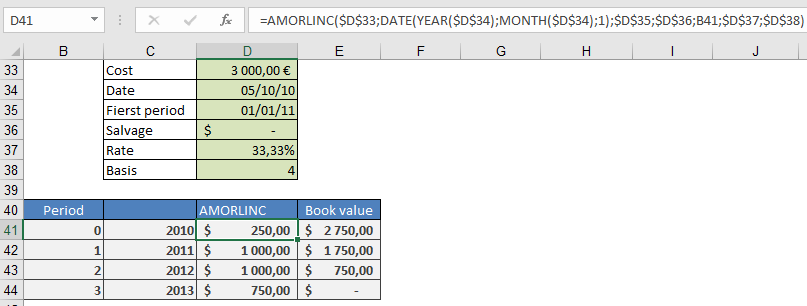
Scenario: Purchase a $3,000 computer on October 5, 2010, with:
- Depreciation rate: 33.333% (3-year lifespan).
- Residual value: $0.
- First period ends: January 1, 2011.
Formula
=AMORLINC(3000, DATE(2010,10,1); « 1/1/2011 »; 0; 0; 33.333%; 4)
Result: $250.00 (depreciation for October–December 2010).
Manual Calculation
- Days in first period:
=DAYS360(DATE(2010,10,1); « 1/1/2011 »; TRUE) → 90 days
- Depreciation:
=3000 × 33.333% × (90/360) → $250.00
Alternative:
=3000 × 33.333% × (3 months / 12) → $250.00
Why Use AMORLINC?
- Simplicity: Straight-line method avoids complex degressive calculations.
- Flexibility: Adaptable to various tax laws with proper Basis selection.
- Accuracy: Handles partial-year depreciation seamlessly.