
This function converts double-byte characters (typically used in Asian languages) to their single-byte equivalents. If the text contains no double-byte characters, it remains unchanged.
Syntax:
ASC(text)
Arguments:
- text (required):
The text string or cell reference containing characters to convert. Can be:- Direct text input (in quotes)
- Cell reference
- Text-formatted number
Background:
Originally developed for legacy systems using:
- Single-byte code pages (256 characters max)
- Double-byte systems for Asian character sets
Modern relevance:
- Most systems now use Unicode (handles all languages)
- Primarily maintained for backward compatibility
- Not available in Excel’s function wizard (must be typed manually)
Technical Notes:
- Behavior with different inputs:
- Empty cells → Returns empty
- Numbers → Returns as text strings
- Arrays → Returns first element only
- Error-free operation:
- Never returns errors (#VALUE!, etc.)
- Simply returns original text if no conversion possible
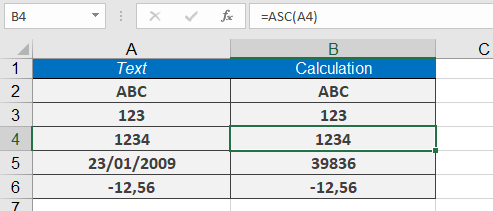
Example Usage:
Though rarely used, sample implementations might include:
=ASC(« ABC ») // Converts full-width ABC to regular ABC
=ASC(123) // Returns « 123 » as text
=ASC(A1) // Processes contents of cell A1
Compatibility:
- Works in all Excel versions but hidden from UI
- Mainly for legacy Asian-language documents
- Modern alternative: UNICODE()/UNICHAR() functions
Note: Practical examples are excluded as this function is essentially obsolete in Unicode-based systems. The book’s sample files contain the only relevant demonstration cases.