
This function returns the inverse hyperbolic sine of a number .
Syntax
ASINH(number)
Argument
- number(required) – Any real number
Background
The inverse hyperbolic sine is the inverse function of the hyperbolic sine. The mathematical formula for the inverse hyperbolic sine (sinh⁻¹) is:
ASINH(x) = ln(x + √(x² + 1))
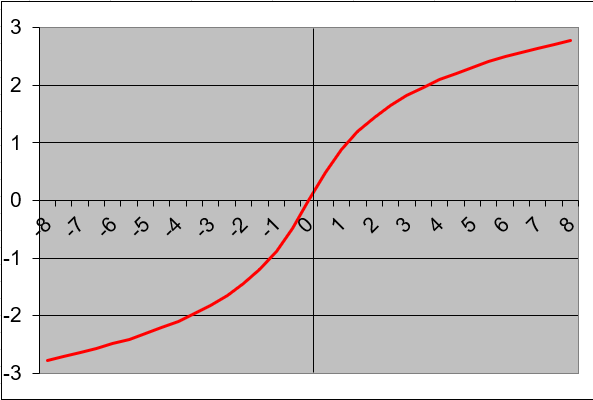
Key Properties:
- Defined for all real numbers (-∞ to +∞)
- Output range is unrestricted (-∞ to +∞)
- The function is odd: ASINH(-x) = -ASINH(x)
- Returns values in radians
Examples:
- =ASINH(0)returns 0
- =ASINH(1)returns 0.88137359
- =ASINH(-1)returns -0.88137359

Applications:
- Physics (relativity and wave equations)
- Engineering (signal processing)
- Statistics (transformations of data)
- Geometry (hyperbolic space calculations)