
The AVERAGE function calculates the arithmetic mean of a specified set of values in a worksheet. This function can accept up to 255 arguments, including cell references, ranges, arrays, and constants.
The AVERAGE function uses the following arguments:
=AVERAGE(number1; [number2]; …)
Number1 (Required Argument): The first number, cell reference, or range for which you want to calculate the average.
Number2 (Optional Argument): Additional numbers, cell references, or ranges to include in the average calculation (up to 255 total arguments).
USING THE AVERAGE FUNCTION
Let’s calculate the average sales of goods in the table below using the AVERAGE function.
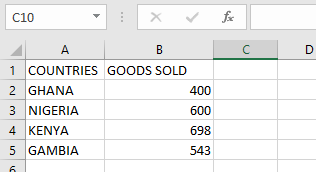
To find the average sales:
- Select an empty cell and enter:
=AVERAGE(B2:B5)
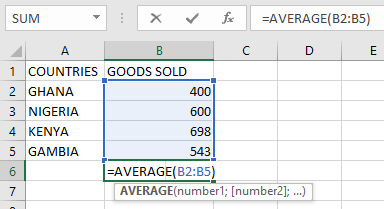
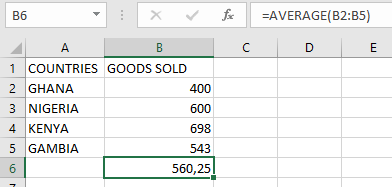
- Press Enter to display the result: 560,25 (as shown in the table below).
NOTE: Important considerations when using the AVERAGE function:
- Empty cells are automatically excluded from the calculation
- Text and logical values in cell references are ignored
- Cells containing zero (0) are included in the calculation
- All referenced cells must contain numeric values
- To include logical values and text representations of numbers, use the AVERAGEA function
- For conditional average calculations, use the AVERAGEIF or AVERAGEIFS functions