This function calculates the average of all cells in a range that meet a specified criterion.
Syntax:
AVERAGEIF(range; criteria; [average_range])
Arguments:
- range (required): The range of cells to evaluate against the criteria. These can include numbers, names, arrays, or references.
- criteria (required): The condition that determines which cells are averaged. It can be a number, expression, cell reference, or text.
- average_range (optional): The actual cells to average. If omitted, the function uses the range argument for both criteria evaluation and averaging.
Background:
For general information on averages, see the description of AVERAGE().
The AVERAGEIF() function measures central tendency—the location of the center of a group of numbers in a statistical distribution. Unlike AVERAGE(), it allows you to apply a criterion that filters which values contribute to the mean.
The three most common measures of central tendency are:
- Average (Mean): The arithmetic mean of the distribution.
- Median: The middle value in a sorted list of numbers.
- Mode: The most frequently occurring value in a dataset.
In a symmetrical distribution, these measures are identical. In a skewed distribution, they may differ.
Example:
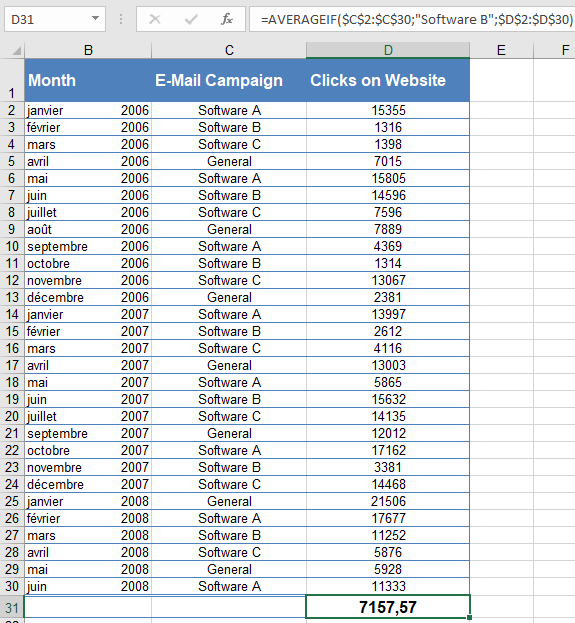
Your software company markets its products through email newsletters. To analyze engagement, you track the click rates on your website after each mailing over the past 30 months.
Question: What is the average click rate after « Software B » mailings?
Using AVERAGEIF():
- Range (criteria evaluation): C2:C30 (contains mailing types, e.g., « Software B »).
- Criteria: « Software B » (only cells matching this label are considered).
- Average_range: D2:D30 (contains click rates to average).
Result: The average click rate after « Software B » mailings is 7,157.57 (see Figure below).