
The AVERAGEIF function calculates the average of cells that meet specified criteria. This function supports logical operators (<, >, <>, =) and wildcards (*, ?) in its criteria.
The AVERAGEIF function uses the following syntax:
=AVERAGEIF(range; criteria; [average_range])
Range (Required Argument): The set of cells to evaluate, which may contain numbers, names, arrays, or number-containing references.
Criteria (Required Argument): The condition determining which cells to average (can be a number, expression, cell reference, or text – e.g., 13, « <14 »).
Average_range (Optional Argument): The actual cells to average. If omitted, the function uses the range argument.
USING THE AVERAGEIF FUNCTION
Let’s calculate the average sales of cakes from the table below.
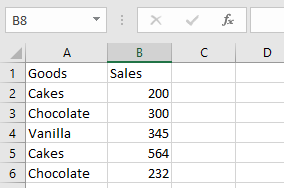
To find the average sales of chocolate cakes:
- Select an empty cell and enter:
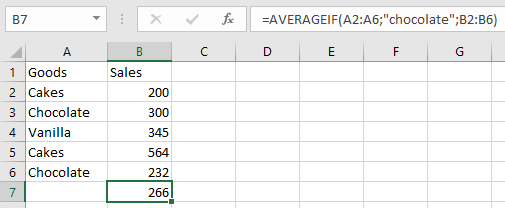
=AVERAGEIF(A2:A6; « chocolate »; B2:B6)

- Press Enter to display the result: 266 (as shown below).
NOTE: Important AVERAGEIF considerations:
- #DIV/0! error occurs when:
- No cells meet the criteria
- The range is empty or contains text
- Criteria referencing empty cells are treated as zero
- Cells with TRUE/FALSE values are ignored
- Supports wildcards (*, ?) in criteria