
This function calculates the average of cells that meet multiple specified criteria.
Syntax:
AVERAGEIFS(average_range; criteria_range1; criteria1; [criteria_range2; criteria2]; …)
Arguments:
- average_range (required): The range of cells to average (must contain numeric values).
- criteria_range1 (required): The first range to evaluate against criteria1.
- criteria1 (required): The condition applied to criteria_range1 (number, expression, cell reference, or text).
- criteria_range2, criteria2, … (optional): Additional ranges and their associated criteria (up to 127 pairs).
Background
For general details on averages, see the AVERAGE() function description. Like AVERAGEIF(), AVERAGEIFS() measures central tendency but allows for multiple filtering conditions.
Example
Continuing the email marketing analysis from AVERAGEIF():
- You previously calculated the average click rate per mailing type.
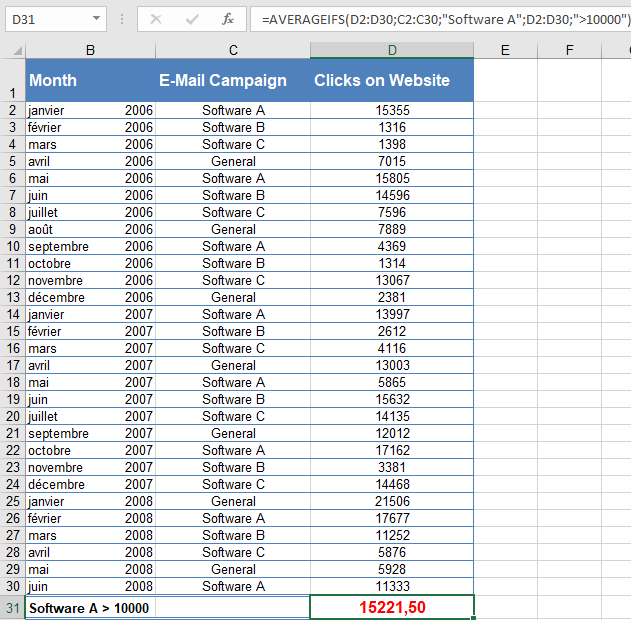
- Now, you want to refine the analysis by excluding low click rates (<10,000) to avoid outlier distortion.
Formula Setup:
- average_range: D2:D30 (click rates to average).
- criteria_range1: C2:C30 (mailing types, e.g., « Software A »).
- criteria1: « Software A » (only include this mailing type).
- criteria_range2: D2:D30 (click rates again, for the second filter).
- criteria2: « >10000 » (only include clicks >10,000).
Result:
The average click rate for « Software A » mailings exceeding 10,000 clicks is 15,221.50 (as seen below).
Key Notes
- Order Matters: The first argument is always the range to average, followed by criteria pairs.
- Flexibility: Supports numeric, text, and logical criteria (e.g., « >10000 », « =Completed »).
- Exclusion Logic: Unlike AVERAGEIF(), AVERAGEIFS() requires all criteria to be met for a cell to be included.