
The AVERAGEIFS function calculates the average (arithmetic mean) of cells that meet multiple specified criteria. This function supports logical operators (<, >, <>) and wildcards (*, ?) in its criteria and was introduced in Excel 2007.
The AVERAGEIFS function uses the following syntax:
=AVERAGEIFS(average_range; criteria_range1; criteria1; [criteria_range2; criteria2]; …)
Average_range (Required): The range of cells to average (containing numbers, names, arrays, or numeric references).
Criteria_range1 (Required): The first range to evaluate against criteria1.
Criteria1 (Required): The condition for criteria_range1 (number, expression, cell reference, or text).
Criteria_range2, criteria2,… (Optional): Additional ranges (up to 127) and their corresponding criteria.
USING THE AVERAGEIFS FUNCTION
Let’s calculate the average salary of full-time male employees from the table below.
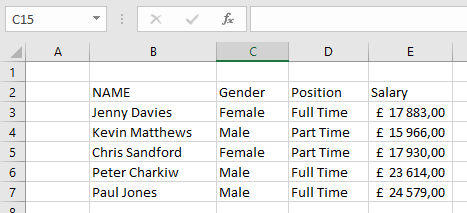
To find this average:
- Select an empty cell and enter:
=AVERAGEIFS(E3:E7; C3:C7; « Male »; D3:D7; « Full Time »)
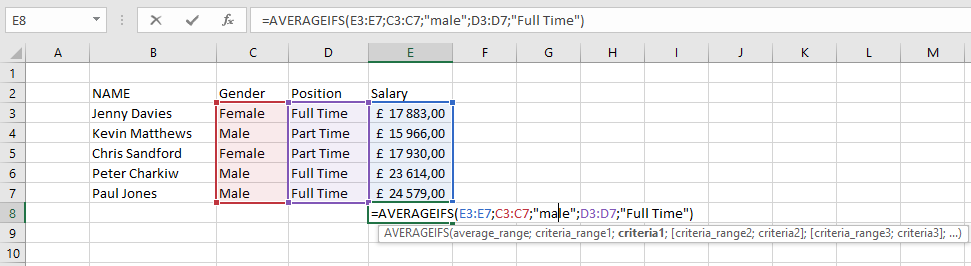
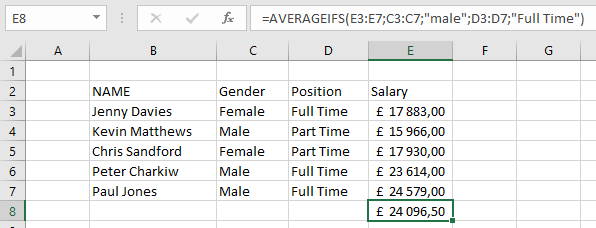
- Press Enter to display the result: £24 096,50 (as shown below).
NOTE: Key points about AVERAGEIFS:
- Empty criteria ranges are treated as zero
- All criteria ranges must match average_range in size
- Numbers/dates with logical operators must be quoted (e.g., « >4/23/2018 »)
- TRUE/FALSE values evaluate as 1/0 respectively
- #DIV/0! error occurs when:
- average_range is empty or contains text
- values can’t be interpreted numerically
- no cells meet all criteria
- Supports wildcards (*, ?) in criteria