
This function returns the modified Bessel function of the second kind, Kₙ(x).
Syntax
BESSELK(x ; n)
Arguments
- x (required)
The value at which to evaluate the function:- Must be a positive real number
- Valid range: approximately 1×10⁻³⁰⁷ to >700
- Upper limit depends on order n (practically unlimited for most applications)
- n (required)
The order of the Bessel function:- Must be positive integer (typically <10 in practice)
- Non-integer values are truncated (not rounded)
Background
Kₙ(x), also known as:
- Basset function
- Macdonald function
- Modified Bessel function of the third kind
It is a solution to the modified Bessel’s differential equation:
x²y » + xy’ – (x² + n²)y = 0
or
y » + (1/x)y’ – (1 + n²/x²)y = 0
Can be expressed in terms of Iₙ(x):

Example
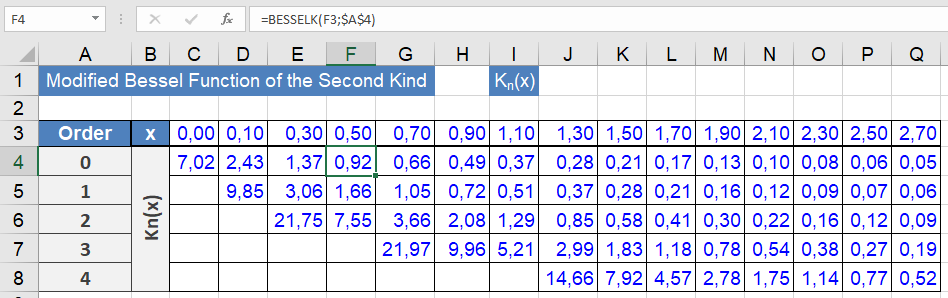
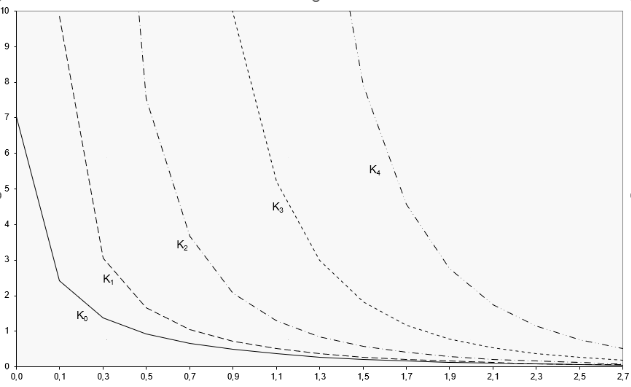
The graphical representation is used to demonstrate Kₙ(x) behavior (see Figures below):
Implementation notes:
- Worksheet calculates Kₙ(x) for orders n=0 to 4
- Higher orders omitted from graph due to large initial values
- Characteristic exponential decay visible in Figure above
Key Properties
- Exhibits exponential decay as x increases
- Singular at x=0 for all orders
- Kₙ(x) > 0 for x > 0
- Satisfies various recurrence relations
Technical Applications
- Solutions to potential problems in cylindrical coordinates
- Heat conduction in annular regions
- Radial wave equations
- Quantum mechanical scattering problems