
This function rounds a number up to the nearest multiple of the specified significance value.
Syntax
CEILING(number; significance)
Arguments
- number (required) – The numeric value you want to round
- significance (required) – The multiple to which you want to round
Key Features:
- Always rounds numbers away from zero
- Handles both positive and negative numbers:
- Positive numbers round up (e.g., 3.2 → 4)
- Negative numbers round down (e.g., -3.2 → -4)
- Returns original value if already an exact multiple
- Returns errors for:
- Non-numeric inputs (#VALUE!)
- Mixed signs between arguments (#NUM!)
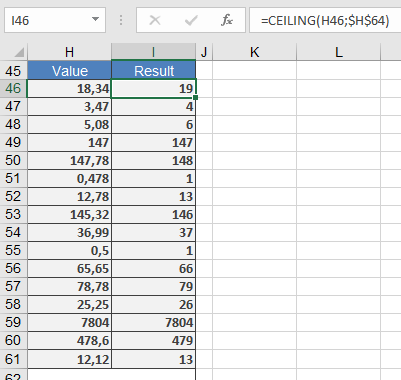
Example:
Comparison with Similar Functions:
| Function | Direction | Multiple-Based | Handles Negatives |
| CEILING | Up (from zero) | Yes | Yes |
| FLOOR | Down (toward zero) | Yes | Yes |
| MROUND | Nearest | Yes | Yes |
| ROUNDUP | Up | No | Yes |