
This function removes all non-printable characters from a text string.
Syntax:
CLEAN(text)
Arguments:
- text (required): The text string or cell reference containing characters to be cleaned
Background:
The CLEAN() function is primarily used to:
- Sanitize text imported from other applications
- Remove control characters (ASCII codes 1-31)
- Eliminate line breaks and other non-visible characters
- Prepare data for export or further processing
Key characteristics:
- Targets characters in the ASCII range 1-31
- Preserves regular spaces (ASCII 32)
- Often used with TRIM() for comprehensive cleaning
Examples:
- Basic cleaning:
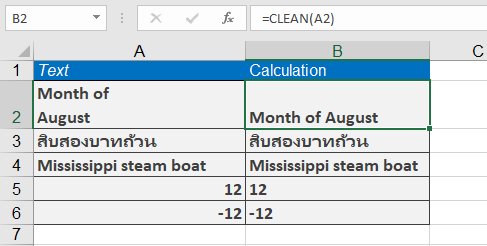
- Original text in A2: « Month of ¶ August »
- Formula: =CLEAN(A2)
- Result: « Month of August »
- Removing embedded line breaks:
=CLEAN(« inter » & CHAR(13) & « continental » & CHAR(32) & « flight »)
Result: « intercontinental flight »
(Removes line break [CHAR(13)] but keeps space [CHAR(32)])
Important Notes:
- Does NOT remove:
- Regular spaces (ASCII 32)
- Non-ASCII characters (e.g., Unicode symbols)
- Printable special characters (e.g., ¶, ©, ®)
- For comprehensive cleaning, combine with:
=TRIM(CLEAN(A1))