
This function returns the numeric ASCII/Latin-1 code of the first character in a text string, based on your system’s character encoding.
Syntax:
CODE(text)
Arguments:
- text (required):
The text string or cell reference containing the character to analyze
(Only the first character’s code is returned)
Background:
The CODE() function is particularly useful for:
- Identifying hidden/special characters in data
- Creating custom sorting or categorization systems
- Working with CHAR() for character manipulation
Key characteristics:
- Inverse function of CHAR()
- Case-sensitive (returns different codes for ‘A’ vs ‘a’)
- Supports ASCII (1-127) and extended Latin-1 (128-255) characters
Examples:
- Basic character codes:
- =CODE(« E ») → 69 (uppercase E)
- =CODE(« Excel ») → 69 (returns first character only)
- =CODE(« x ») → 120 (lowercase x)
- Getting non-initial character codes:
=CODE(MID(« Excel »,2,1)) // Returns 120 (x)
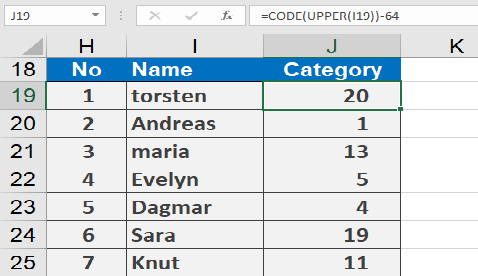
- Alphabet position calculation:
=CODE(UPPER(« torsten »))-64 // Returns 20 (T is 20th letter)
Common Uses:
- Data validation (identifying invisible characters)
- Custom categorization (e.g., A=1, B=2,…)
- Cleaning imported data with special characters
Technical Notes:
- Case Handling:
- ‘A’=65, ‘B’=66,…’Z’=90
- ‘a’=97, ‘b’=98,…’z’=122
- Space character = 32
- Numbers 0-9 = 48-57