
This function returns the column number of a given cell reference.
Syntax:
COLUMN([reference])
Arguments:
- reference (optional): Must evaluate to a cell reference or range.
Background:
- If the reference argument is omitted, the function returns the column number of the cell containing the formula.
- If reference is a range (or a named range), the function can be used in array formulas:
- If the output range has fewer columns than the input, excess data is truncated.
- If the output range has more columns than the input, extra cells display #N/A.
Example:
Suppose you want to sum numbers in a row based on whether their column numbers are even or odd.
- A number is even if:
(2 * INT(A1 / 2) – A1) = 0 → TRUE
- A number is odd if:
(2 * INT(A1 / 2) – A1) <> 0 → TRUE
If cells B21:E21 contain numbers:
- Sum of even columns:
{=SUM((INT(COLUMN(B21:E21)/2)*2 – COLUMN(B21:E21) = 0) * B21:E21)}
- Sum of odd columns:
{=SUM((INT(COLUMN(B21:E21)/2)*2 – COLUMN(B21:E21) <> 0) * B21:E21)}
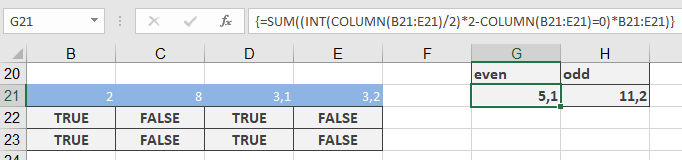
This works because Excel interprets:
- TRUE as 1
- FALSE as 0